
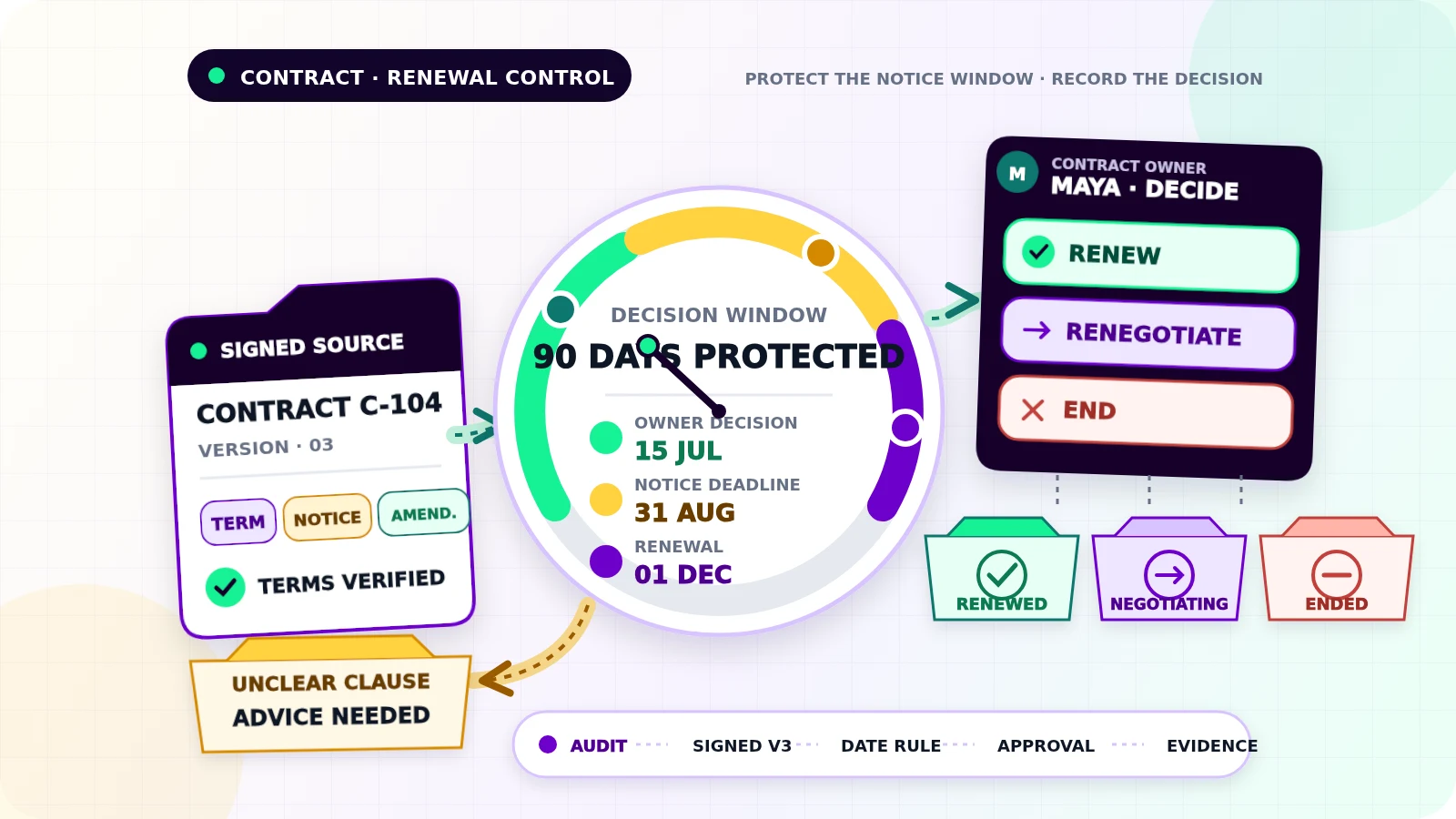
A contract can renew on 1 December while the last day to stop it is 31 August. A calendar alert on the renewal date is already too late.
Contract renewal reminder automation should protect the decision window, not merely announce an anniversary. A useful workflow captures the signed terms, calculates review dates, asks a named person what to do, records the approved outcome, and stops once the contract is renewed, renegotiated, or ended. It should never interpret unclear language or commit the business on its own. For the broader foundation of triggers, ownership, and visible exceptions, read Flowmatic’s small-business workflow automation guide.
Build the record from the signed contract
Choose one contract register as the operational source of truth. The signed agreement and approved amendments remain the legal source documents; the register points to them and holds the fields needed to act. Keep this renewal workflow separate from the agreement-to-kickoff process described in the client onboarding automation guide.
For each contract, record:
- a stable contract ID and current document version
- supplier or customer legal name and internal business unit
- contract owner and backup owner
- start date, initial term, and current end or renewal date
- renewal type: manual, automatic, rolling, or unknown
- notice period, notice deadline, delivery method, and recipient
- governing time zone or stated cutoff time when relevant
- value, currency, service, and internal budget owner
- secure document link, amendment links, and last verification date
Do not calculate from an unsigned draft, old email attachment, or filename that says “final.” If an amendment changes the term or notice clause, create a new version, preserve the old values, and recalculate future tasks from the approved amendment.
Ambiguous phrases such as “90 days before expiration,” “three calendar months,” or “business days” need human review. The workflow can surface the clause and proposed date, but a qualified adviser or authorized owner should settle the interpretation.
Separate the dates that drive the decision
The renewal date, notice deadline, internal review date, and decision deadline are different fields.
Start with the date stated in the current signed terms. Calculate the notice deadline under the approved rule, then place the internal decision deadline far enough before it to allow pricing review, negotiation, approval, and formal delivery. Add an earlier review date for contracts that need competitive quotes, security review, or budget approval.
Store date-only obligations as date-only values. When a deadline includes a time, save the local value, named time zone, and an unambiguous timestamp. RFC 3339 defines an internet timestamp format with an explicit relationship to UTC, which is useful for logs and system-to-system handoffs.[1] Do not silently treat local midnight as UTC or assume every office shares the same holiday calendar.
Validate impossible dates, missing years, end dates before start dates, notice deadlines after renewal, and changed time zones. Recalculate only from versioned inputs. A new calculation should show the previous date, new date, rule used, and person who approved the change.
Use states that reflect a real decision
A small state model keeps reminders tied to work rather than time alone:
Active: terms verified; no review is dueReview due: the review window openedAwaiting decision: the owner must choose an outcomeRenegotiating: discussions are active with a dated next actionRenewal approved: authorized renewal is being completedNon-renewal approved: notice must be prepared and sentNotice sent: delivery evidence is recordedRenewed,Ended, orReplaced: final outcome recordedException: dates, ownership, documents, or delivery need attention
The decision should be explicit: renew as-is, renegotiate, replace, end, or seek advice. “Seen” and “reminded” are not outcomes. Record the decision-maker, date, reason, approval evidence, proposed spend or savings context, and next action.
Human approval matters because renewal may create financial, service, staffing, or legal commitments. The automation may prepare a task or notice draft. It should not accept new terms, send formal notice, or cancel a service unless the authorized person has approved that exact action and delivery route.
Remind the owner, then escalate without creating noise
Set the cadence backward from the notice deadline, not forward from the contract start date. A higher-value or harder-to-replace service may need an early review. A simple low-risk subscription may need less lead time. The status-aware date and time patterns in the appointment reminder automation guide are useful here, provided contract decisions and notice evidence remain separate.
Each reminder should show the contract, current version, renewal and notice dates, remaining decision time, owner, current state, and one requested action. Send it to the owner rather than a broad inbox. If the owner does not act, escalate to the backup or budget holder under a defined rule.
Before every reminder, re-read the current record. Stop when the outcome is final, the contract was replaced, formal notice was confirmed, or a person paused the workflow. Renegotiation should switch to dated negotiation tasks rather than continue the original renewal sequence.
Prevent duplicate tasks and conflicting decisions
One contract may arrive through email, a shared drive, and manual entry. Match candidates using the stable contract ID, counterparty, signed date, document fingerprint, and current version. Similar supplier names or equal values are not enough to merge records automatically.
Give each planned action a stable key such as contract ID + version + milestone. A retry should find the existing review task or reminder instead of creating another. Stripe documents the same idempotency principle for API writes: retries that use the same key can avoid performing the operation twice.[2]
Also guard against concurrency. If the owner approves renewal while procurement records non-renewal, pause both paths, preserve the history, and route the conflict to an authorized decision-maker.
Keep evidence, access, and exceptions under control
The audit trail should answer which terms were used, how each date was calculated, who received each reminder, who decided, what was approved, and whether required notice was delivered. Keep the source document, calculation inputs, state changes, comments, approval evidence, send result, delivery evidence, and final replacement or renewal reference.
Contract files may contain pricing, personal details, bank information, or confidential terms. Restrict access to the minimum needed for each role, which matches NIST’s definition of least privilege.[4] If the register uses Google Drive, its viewer, commenter, and editor roles provide different access levels, and folder access may be inherited by files inside it.[3] Review inherited access and offboard former staff rather than assuming a hidden link is private.
Use one exception view for missing signed documents, unclear clauses, invalid dates, absent owners, amendment conflicts, duplicate candidates, missed decisions, failed reminders, approval conflicts, and unconfirmed notice delivery. Every exception needs a named owner, reason, first-failure time, evidence link, and dated next action.
Test the deadline failures before launch
Test a normal manual renewal, automatic renewal, rolling term, amended end date, leap-day contract, month-end calculation, business-day wording, daylight-saving boundary, missing time zone, absent owner, duplicate upload, simultaneous decisions, paused renegotiation, reminder retry, failed notice delivery, and a contract replaced before renewal.
For each case, verify the calculated dates, record version, reminder count, state, owner, approval, stop condition, evidence, and audit history. Start with a monitored set of contracts and require approval for every external action. Expand only after the team can correct a date or recover a failed send without losing history or issuing conflicting instructions.
If renewal decisions still depend on calendar memory and scattered files, request a Flowmatic workflow audit. We will map the contract record, date rules, decision owners, approval points, reminder stops, and exception handling before recommending a build.
Sources
- [1] https://datatracker.ietf.org/doc/html/rfc3339 — RFC 3339 - Date and Time on the Internet: Timestamps
- [2] https://docs.stripe.com/api/idempotent_requests — Idempotent requests | Stripe API Reference
- [3] https://support.google.com/drive/answer/2494822 — Share files from Google Drive | Google Drive Help
- [4] https://csrc.nist.gov/glossary/term/least_privilege — Least privilege | NIST CSRC Glossary
Replace scattered contract dates and calendar memory with one owned decision workflow
Map contract records, deadlines, decisions, approvals, and exceptions
Flowmatic can map your renewal workflow before recommending a build, including source records, date rules, decision owners, approval points, reminder stops, and exception handling.
Request a workflow audit