Workflow automation can sound like a large software project involving complex platforms, consultants, and months of implementation.
For most small businesses, it should mean something much simpler:
A customer takes an action, the right information moves to the right place, and the next step becomes clear without someone having to remember it.
That might be a website inquiry automatically added to a lead sheet. It could be a quote request that creates a follow-up task, or a new client form that starts an onboarding checklist.
The goal is not to automate your entire business. It is to remove one recurring bottleneck at a time.
Start with the handoff that loses the most attention
Many small-business processes are not completely broken. They are disconnected.
A potential customer submits a form. The notification reaches an inbox. Someone copies the details into a spreadsheet. A WhatsApp message is sent later. The owner tries to remember whether anyone followed up.
Every individual tool may work, but the handoffs between them depend on memory.
That is usually where a useful first automation begins.
For many service businesses, the best starting point is the workflow between a new inquiry and the first meaningful follow-up. It is close to revenue, happens repeatedly, and has a clear outcome: every qualified lead should have an owner and a visible next action.
The five parts of a practical lead workflow
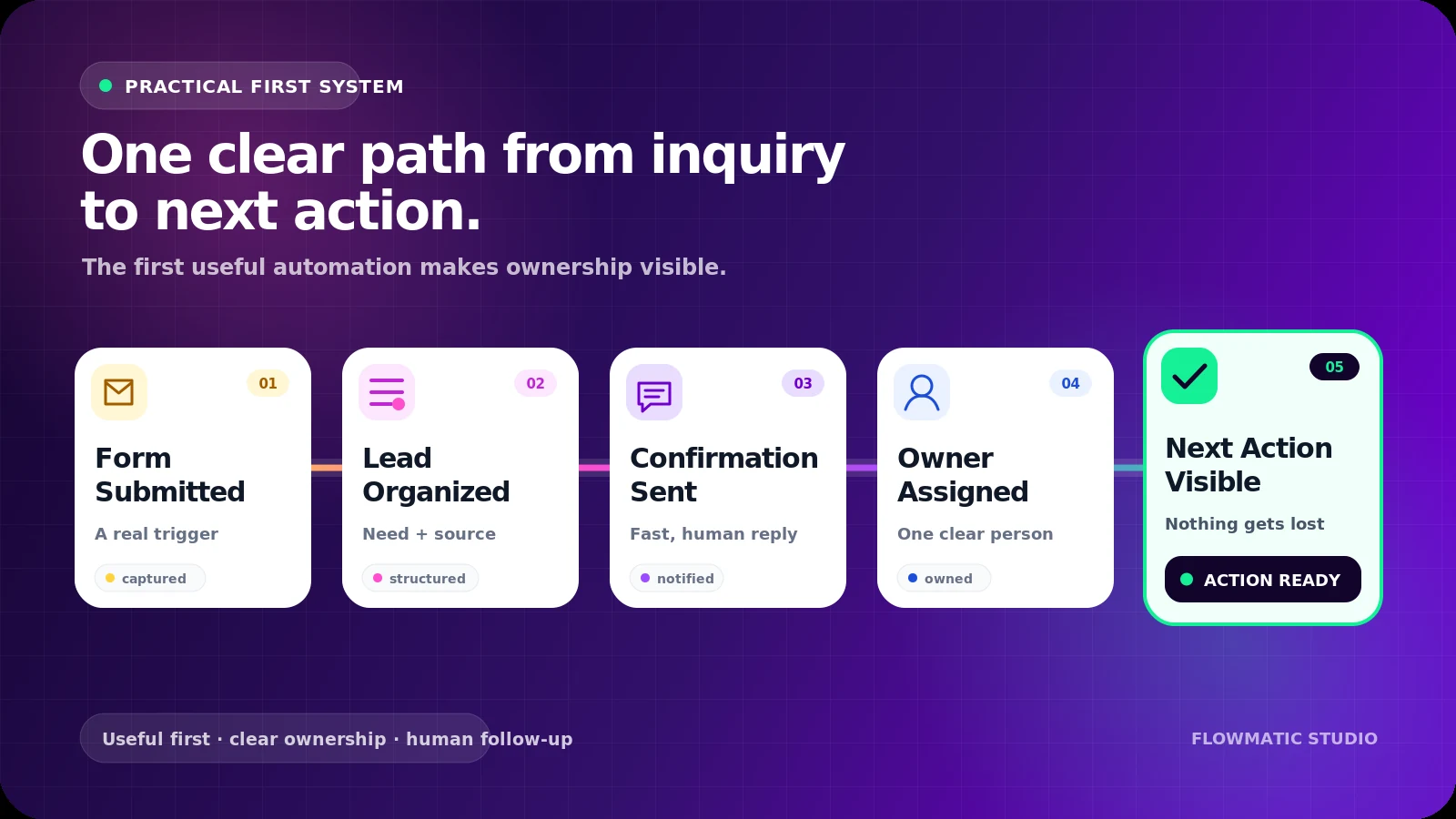
A reliable workflow does not need dozens of steps. A useful first version can contain five.
1. Capture
The process begins when someone submits a contact, quote, booking, or qualification form.
Collect only the information needed to decide what happens next. This might include:
- Name and contact details
- Service requested
- Location
- Preferred contact method
- Desired timing
- A short description of the request
- Lead source
More fields do not automatically create a better workflow. Ask for information that changes the next action.
2. Organize
The submission should create or update one structured record.
That record can live in a lightweight CRM or a well-designed spreadsheet. What matters is that the team has one dependable place to see the lead’s details and status.
A basic lead record might contain:
- Contact information
- Source
- Service category
- Assigned owner
- Current status
- Next action
- Follow-up date
- Notes
The system should also check for an existing record when possible, rather than creating a new duplicate every time the same person makes contact.
3. Acknowledge
The customer should receive a short confirmation through the appropriate channel.
This is not the full sales conversation. It simply confirms that the request arrived and explains what will happen next.
For example:
Hi Sarah, thanks for contacting Northside Roofing. We received your request about a roof inspection. Daniel will review the details and contact you by the end of the next business day.
A useful confirmation sets an expectation. A generic “your form was submitted successfully” message does not.
4. Assign
Every active lead needs a person responsible for the next step.
Assignment can be based on service type, location, availability, or a simple default rule. In a very small business, every lead may go to the owner. That is still an assignment rule.
The workflow should then create a concrete task, such as:
- Call the lead today
- Review the attached document
- Prepare an estimate
- Ask one missing qualification question
“New lead received” is a notification. “Call Sarah before 4:00 p.m.” is an action.
5. Surface what is stuck
Automation should not only move information. It should reveal when the process stops moving.
A simple owner view can show:
- New leads without an owner
- Leads without a next action
- Follow-ups due today
- Overdue callbacks
- Quotes awaiting a response
- Leads closed or marked unqualified
This exception view is often more useful than a complicated dashboard. The owner does not need to inspect every successful automation. They need to see what requires attention.
A practical example
Imagine a local accounting firm receiving inquiries through its website.
Before automation, each form sends an email to the general inbox. The owner forwards it to the right employee, someone copies the details into a spreadsheet, and the prospect may or may not receive a response that day.
A small connected workflow could work like this:
- A prospect selects “Monthly bookkeeping” on the inquiry form.
- The details are added to the firm’s lead table.
- The lead is tagged as a bookkeeping inquiry.
- The prospect receives a confirmation with the expected response time.
- A consultation task is assigned to the bookkeeping manager.
- If no next action is recorded by the agreed deadline, the lead appears in an overdue view.
- When the lead becomes a client, the status change starts an onboarding checklist.
The workflow does not replace the consultation. It makes sure the consultation has the information, ownership, and timing it needs.
For adjacent examples, see a document and client onboarding workflow, explore a practical lead capture and callback workflow, or find gaps in a local-service quote workflow.
How to build your first workflow
Step 1: Map the current process
Choose one real inquiry and trace what happens from arrival to follow-up.
Write down:
- What starts the process?
- Where does the information arrive?
- Who needs to act?
- What does the customer expect?
- Where is progress recorded?
- What is most commonly forgotten?
Map what actually happens—not what the internal procedure says should happen.
Step 2: Define one successful outcome
Make the result observable.
For example:
Every website inquiry appears in one lead list, receives confirmation, has an assigned owner, and has a dated next action.
This is clearer than “improve lead management.”
Step 3: Standardize the minimum information
Agree on a small number of required fields and statuses.
A simple pipeline might use:
- New
- Contacting
- Qualified
- Quote sent
- Won
- Closed
Avoid building a detailed CRM structure before the team has agreed on what each stage means.
Step 4: Connect the smallest useful system
Connect one lead source first. Do not begin with every website form, inbox, social channel, and advertising platform at once.
A first version may be:
Website form → CRM or Google Sheet → confirmation email → assigned task → overdue view
Once that works reliably, additional sources and branches can be added.
Step 5: Test normal and messy cases
Use test submissions to check:
- Missing optional information
- Duplicate contacts
- Incorrect email addresses
- Different service selections
- Assignment rules
- Notification failures
- Leads that reply quickly
- Leads that never respond
Also decide what happens when an automated step fails. A workflow without a visible failure path can quietly create a new blind spot.
Keep the relationship human
Good automation supports the conversation instead of pretending to be the conversation.
Automate:
- Data entry
- Confirmations
- Routing
- Task creation
- Reminders
- Status updates
- Reporting
Keep human judgment where it matters:
- Understanding unusual requests
- Giving professional advice
- Discussing price or scope
- Handling objections
- Building trust
- Making exceptions
A short, relevant message connected to a real next step is more useful than a long sequence that keeps sending after the customer has already replied.
Common mistakes to avoid
The first is automating a process nobody has defined. If the team cannot agree on lead stages, ownership, or response expectations, software will reproduce the confusion faster.
The second is overbuilding. Complex scoring, AI classification, and multi-channel sequences can wait until the basic handoff works.
The third is hiding failure. Every important workflow needs a way to show missing data, overdue actions, and unsuccessful deliveries.
Finally, do not confuse activity with progress. Sending five automated messages is not success if nobody owns the actual customer conversation.
A simple readiness checklist
Your first workflow is ready to build when you can answer these questions:
- What exact event starts it?
- What information must be captured?
- Where will the main record live?
- Who owns the next action?
- What should the customer receive?
- When is follow-up considered overdue?
- How will the owner see exceptions?
- What event ends or changes the workflow?
If those answers are clear, the technical build is usually the easier part.
Small business workflow automation does not have to begin with a major platform. Start with one real bottleneck, connect the handoffs, and make the next action visible.
That is how a small system becomes genuinely useful.
A practical first workflow
Make lead follow-up and honest review requests visible
The $99 Review & Lead Follow-up Starter maps one customer journey, builds a simple tracker, and prepares the messages and next actions your team needs. Optional management is separate.
See the $99 Review Engine