
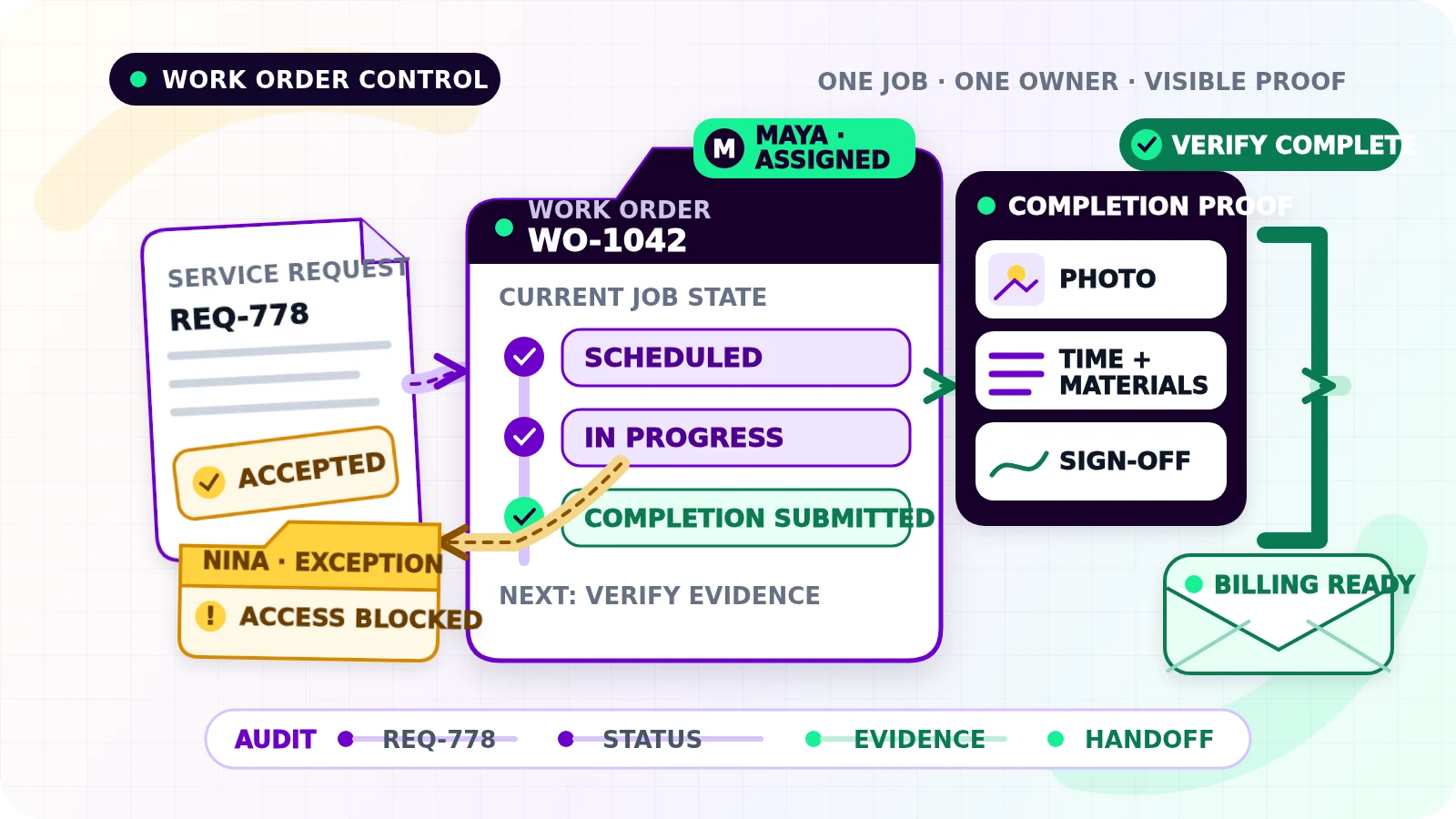
A service request can arrive by phone, form, email, or conversation on site. If someone then copies it into a calendar, messages a technician, and relies on memory for the result, the business does not have a dependable work order process. It has several disconnected handoffs.
Work order automation for small businesses should create one controlled path from an accepted request to assigned work, visible progress, completion evidence, and a clean billing-ready handoff. It should not decide whether a risky repair is safe, approve an unexpected charge, or claim that work is complete without evidence.
Start with one work order record
A work order is the operating record for a specific piece of work. Give it a stable ID and link it to the customer and original request. Keep the minimum information the team needs to plan, perform, verify, and hand off the job:
- customer, service location, and contact details
- service requested, scope, priority, and access notes
- requested date, promised window, and relevant service-level rule
- assigned owner, technician or crew, and fallback owner
- required skills, equipment, parts, permits, or safety checks
- current status, next action, due time, and last update
- estimate, contract, or approved-price reference
- completion notes, time, materials, photos, sign-off, and follow-up need
- exception reason, resolution owner, and linked billing record
Avoid using a notes field as the whole system. Fields that drive assignment, status, alerts, or reporting need consistent values. Keep sensitive access details restricted rather than copying them into every message and calendar event.
Use statuses that describe operational truth
A short state model is easier to maintain than dozens of labels. A practical starting set is:
New request: captured but not yet accepted as workNeeds review: scope, priority, price, access, or requirements need a decisionReady to assign: accepted and complete enough to scheduleAssigned: a named person or crew owns the jobScheduled: a current service window is recordedIn progress: work has startedBlocked: progress cannot continue and a reason and owner are recordedCompletion submitted: the assignee supplied the required result and evidenceVerified complete: an approved completion check passedBilling ready: the agreed billing fields and references are presentClosed: the operational handoff finishedCanceled: the business deliberately stopped the order
Define who may move each status and what evidence is required. Time passing should not change In progress to Verified complete. A technician leaving the site is also not enough when a customer sign-off, test result, or return visit is still open.
Build the trigger-to-close workflow
First, capture the request through an approved intake route. Validate the customer, location, contact method, requested service, and source request ID. A website inquiry may begin in a broader small-business workflow automation process, but a work order should begin only when the request is accepted for delivery—not whenever a new lead appears.
Next, decide whether the request is ready. Standard, low-risk work may pass a written rule. Unclear scope, urgent safety issues, warranty questions, unusual access, or unapproved pricing should go to a named reviewer. That person can accept, return, reject, or request more information with a reason.
Then assign the work. Route by service type, territory, skill, availability, or a simple default rule the team understands. Assignment is complete only when a named person accepts ownership. A message to a group chat is a notification, not ownership.
Before the visit, confirm the latest schedule, location, scope, access instructions, and required resources. If the customer reschedules, replace the old schedule rather than leaving two active plans. The related appointment reminder automation guide explains how confirmations, rescheduling, replies, and stop rules should remain tied to current booking state.
During delivery, let staff record concise updates against the work order: arrival, work started, blocker, parts used, next action, and completion submission. The workflow can timestamp and route those events. It should not force technicians to write a report after every minor step.
Finally, verify completion against the business's rule. Confirm the delivered scope, required evidence, unresolved defects, customer acknowledgement where applicable, labour and materials, and whether another visit remains open. Only then create the billing-ready handoff. Accounting should receive the work order ID, customer and job references, approved pricing basis, billable items, completion evidence, and exception history—not a request to reconstruct the job from messages.
Keep exceptions in the operating view
Automation is useful when awkward jobs remain visible. Create one exception queue for issues such as:
- missing or conflicting scope
- no qualified assignee or rejected assignment
- scheduling conflicts or failed customer contact
- missing part, access problem, or safety hold
- job paused beyond its expected window
- incomplete photos, readings, notes, or sign-off
- labour or materials outside the approved basis
- completion submitted while a return visit remains open
- failed system update or a possible duplicate work order
Each exception needs the work order ID, failed stage, plain-language reason, named owner, first failure time, latest update, and dated next action. Retry temporary connection failures within a limit. Do not retry missing approvals or ambiguous completion as though they were technical outages.
Put human approval where judgment changes the outcome
Keep people in control when accepting unusual work, overriding priority, approving out-of-scope cost, clearing a safety or compliance hold, accepting incomplete evidence, or confirming a disputed completion. Show the reviewer the current work order, source request, relevant history, proposed decision, and downstream effect together.
Record who approved what, when, and why. Approval should be a defined business action, not a vague reply buried in chat.
Implement the smallest reliable version
Start with one service type and one intake channel. Write the required fields, status definitions, assignment rule, completion checklist, exception owners, and billing-ready definition before connecting tools.
Build the happy path, then test missing information, duplicate requests, simultaneous updates, rejected assignment, rescheduling, a blocked job, partial completion, a reopened job, failed evidence upload, and a system timeout after a successful write. Run the first jobs with staff review enabled. Add routes and automatic transitions only after the team can recover the failed cases.
This boundary matters: work order automation owns accepted service delivery from request to verified operational completion. It does not replace lead qualification, appointment communication, scope-change approval, invoice creation, or payment collection. Those processes can connect through stable IDs and explicit handoffs without becoming one oversized workflow.
Measure reliability, not activity
Track a small operating set: accepted requests without owners, time from acceptance to assignment, scheduled jobs without current confirmation, blocked jobs by reason and age, completion submissions awaiting review, verified jobs not yet billing ready, reopened jobs, duplicate records, and exceptions past their next-action date.
Review the records behind each measure. A shorter completion time is not an improvement if staff skip evidence or close jobs that need another visit. The useful outcome is simple: every active job has a truthful status, a named owner, and a visible next action.
If service requests still move through messages, calendars, and memory, request a Flowmatic workflow audit. We will map the work order record, ownership rules, status changes, completion proof, exception queue, and billing handoff before recommending a build.
Make every active job visible
Map a work order workflow your team can trust
Flowmatic can map the work order record, ownership rules, status changes, completion proof, exception queue, and billing handoff before recommending a build.
Request a workflow audit