
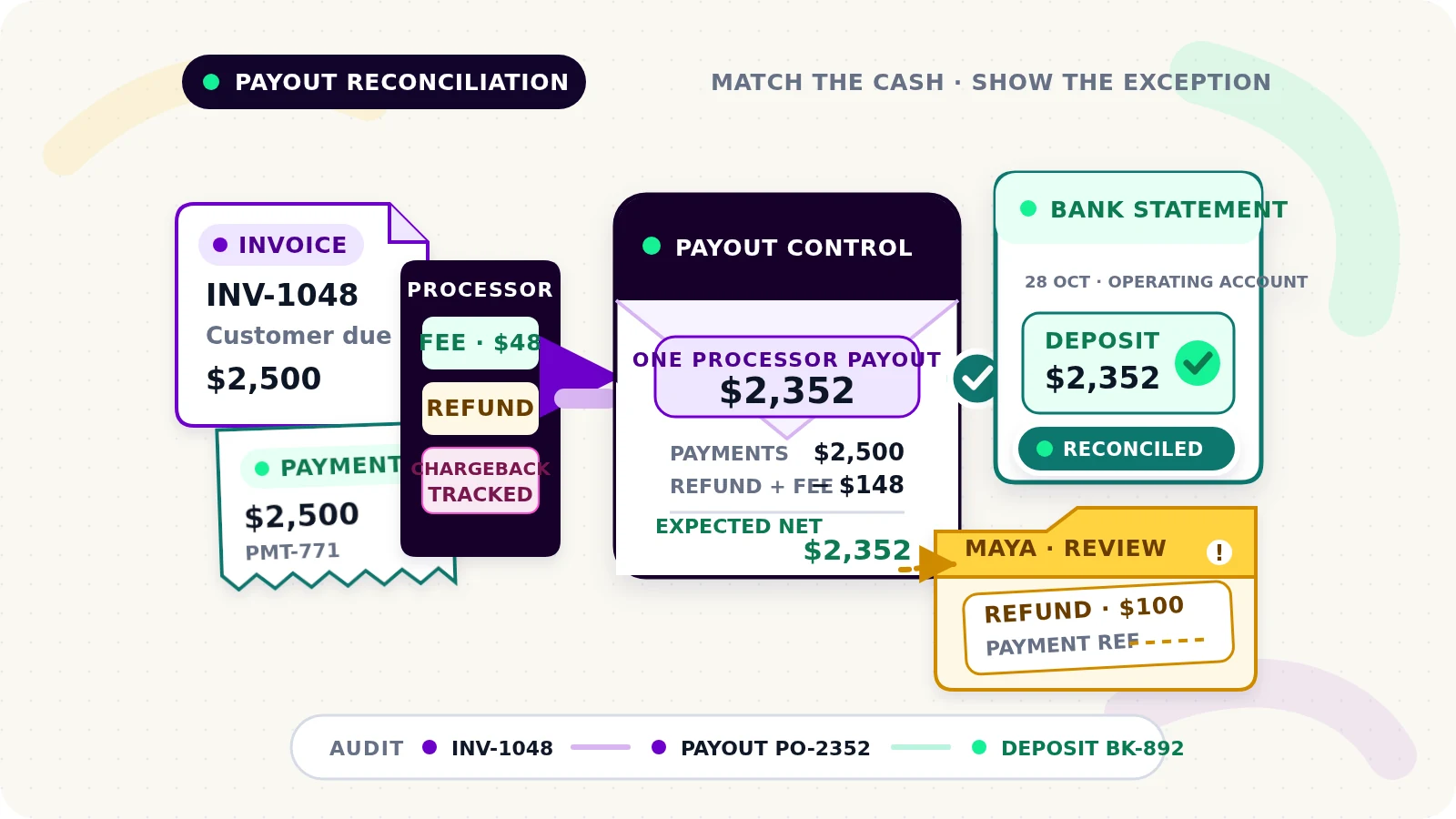
A customer pays a $1,000 invoice, but the bank receives a smaller deposit two days later. The difference may include processing fees, a refund from another sale, or several payments grouped into one payout. Matching the deposit to the invoice amount alone will not explain it.
Payment reconciliation automation for small businesses should connect the full chain: invoice, customer payment, processor activity, payout, and bank deposit. It should explain known differences and place uncertain transactions in a visible queue for a named reviewer.
This is separate from invoice reminder automation, which decides whether an unpaid customer needs follow-up, and job-completion-to-invoice automation, which prepares completed work for billing.
Keep the records separate before matching them
Several records can describe one movement of money, but they are not interchangeable:
- An invoice states what the customer owes under the business's billing process.
- A payment record shows that a payment provider or accounting system recorded money against a customer or invoice.
- A processor settlement or payout groups balance activity that the provider sends to the business.
- A bank deposit is the amount that actually arrives in the bank account.
- A fee is a separate cost that can reduce the net amount.
- A refund returns money through the payment flow and may affect a later payout.
- A chargeback is a payment reversal handled through the card or payment dispute process; it is not the same as a voluntary refund.
- An unmatched exception is any record the workflow cannot connect confidently or explain completely.
Give each record its own source ID, amount, currency, event date, available or settlement date, and status. Link records using provider references and stable internal IDs. Do not overwrite a $1,000 payment with a $970 deposit just to make the spreadsheet balance.
Match in three controlled stages
Start with exact references, then use constrained rules. A practical workflow has three stages.
First, match the customer payment to an invoice using a processor payment ID, invoice reference, accounting payment ID, or another durable identifier. An amount and customer name can support the match, but should not be the only evidence when duplicate amounts or shared names are possible.
Second, match processor activity to a payout. Use the provider's payout or settlement report rather than assuming every payment arrives separately. Stripe's payout reconciliation report, for example, can show the payments, refunds, disputes, fees, and other balance transactions included in an automatic payout.[1] PayPal also documents separate reports for reconciling daily payments and fees or matching automated payouts to payment activity.[2]
Third, match the payout to the bank deposit using the payout ID when the bank description carries it, plus currency, net amount, and expected arrival window. A date difference alone is not an error: payment date, payout date, and bank posting date can differ. Keep all three.
Reconcile gross activity to the net deposit
For each payout, calculate a control total from the provider data:
payments - refunds - chargebacks - fees + reversals or adjustments = expected net payout
The exact signs and categories depend on the provider's report, so map them explicitly instead of applying this line blindly. Keep one row per component and one summary per payout.
Then compare the expected net payout with the actual bank deposit. Mark the payout Reconciled only when the currencies agree, the component total equals the reported payout, and the bank deposit matches under the business's approved tolerance. Do not use a broad rounding tolerance to hide unexplained differences.
A fee should remain a fee record linked to the payout. A refund should remain linked to the original payment when the provider supplies that relationship, even if its cash effect appears in a later payout. A chargeback should keep its case or dispute reference and current status. This preserves the trail from customer transaction to bank cash.
Route uncertain matches to a named reviewer
Confidence rules should be simple enough to explain. An exact provider ID plus matching currency and amount may qualify for automatic matching. A shared amount and nearby date may only create a candidate.
Send the item to review when:
- a payment has no invoice reference
- one payment could match several invoices
- a payout has no bank deposit after the expected window
- a bank deposit could match more than one payout
- currencies differ
- the component total does not equal the payout
- a refund or chargeback has no original payment link
- a fee category is unknown
- a record changed after it was reconciled
Every exception needs a reason, source links, owner, first-seen time, and dated next action. Use a real assignment such as Maya · finance review, not Office team.
The reviewer can confirm a match, split a payment across invoices, link an existing record, request missing information, record an approved adjustment, or leave the item open. The system should record who decided, when, and why. It should not invent an accounting category or decide how a disputed transaction should be treated. This is workflow guidance, not accounting, tax, or legal advice.
Example: one payout, several movements
A maintenance company has three customer payments: $600, $900, and $1,000. The processor payout also contains a $100 refund and $48 in fees, so the expected bank deposit is $2,352.
The workflow matches each payment to its invoice using provider references. It links all three payments, the refund, and the fees to one payout, calculates the $2,352 net amount, and matches that payout to the bank deposit.
The refund lacks an original payment reference. The payout can still match the bank, but the refund remains an exception assigned to Maya. She finds the customer record, links the refund to the correct payment, and records the evidence. The workflow does not force the refund against whichever invoice happens to have the same amount.
Build the exception view before unattended matching
A useful daily view shows unreconciled payouts, deposits without payout matches, payments without invoices, unresolved refunds and chargebacks, unknown fees, stale imports, changed records, and reopened reconciliations.
Start with one processor, one bank account, and a monitored period. Let the workflow propose matches while a person confirms them. Expand automatic matching only after the same rules work across normal transactions and exceptions.
Test partial payments, one payment covering several invoices, several payments covering one invoice, tips, fees, refunds in later payouts, chargebacks and reversals, foreign currencies, payout delays, failed payouts, duplicate imports, manual bank entries, missing references, equal-value transactions, data corrections, and an integration timeout followed by a retry.
For each case, verify the invoice balance, payment link, payout components, expected net amount, bank deposit, exception owner, decision history, and final status. A green Reconciled label should mean the chain is explainable, not merely that two totals were made equal.
If reconciliation still means chasing processor exports, bank lines, and invoice tabs, request a Flowmatic workflow audit. We will map the records, match rules, control totals, review ownership, and failure paths before recommending a build.
Sources
[1] https://docs.stripe.com/reports/payout-reconciliation — Stripe Documentation: Payout reconciliation report
[2] https://developer.paypal.com/reports/overview — PayPal Developer: Reports overview
Make every deposit explainable
Map a reconciliation workflow your team can trust
Flowmatic can map your records, matching rules, control totals, exception ownership, and failure paths before recommending a build.
Request a workflow audit