
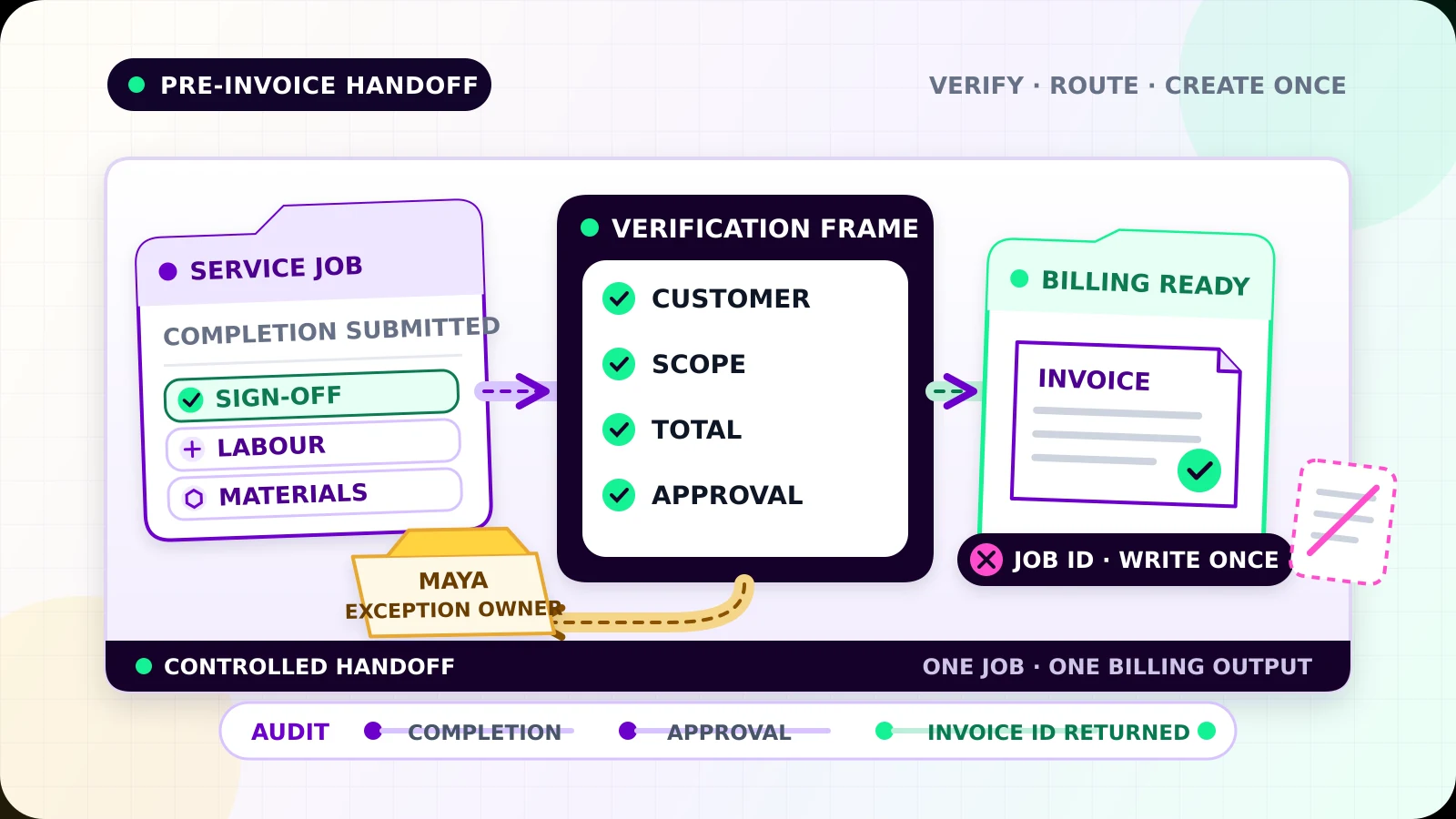
A technician can finish the work at 3:00 p.m. and still leave billing waiting for days. The completion note may be in one app, the signed approval in a photo, and the extra materials in a message to the office.
Job completion to invoice automation should close that gap. Its job is to turn verified completed work into one billing-ready record, with enough evidence for the office to create the right invoice once. It does not chase payment. That later stage belongs to a separate invoice reminder automation workflow.
Define “verified complete” before triggering billing
Do not trigger an invoice because an appointment ended or a technician tapped Done. Time passing is not proof that the agreed work was delivered.
Use a small state model that makes the handoff visible:
Work in progress: the job is still openCompletion submitted: the field team says the work is finishedVerification required: evidence or approval is still missingVerified complete: the approved completion rule has passedBilling review: a person must resolve a pricing or scope questionBilling ready: the record has everything billing needsInvoice created: the accounting system returned the invoice IDException: the handoff failed and has an owner
A cleaning company may need the assigned worker’s completion time and a customer sign-off. A repair business may require labour time, parts used, completion photos, and confirmation that no return visit remains open. A consultant may require the final deliverable and client acceptance.
Record who or what verified completion, when it happened, the source job ID, and the rule version used. If the job reopens, move it out of Billing ready unless a person confirms the invoice can still proceed.
Build one billing-ready record
Billing should not reconstruct the job from emails and chat history. Create one structured record linked to the original work order.
Include:
- stable job and customer IDs
- legal billing name and billing contact
- service address when relevant
- service date or covered period
- approved quote, contract, or rate reference
- labour, materials, travel, discounts, deposits, and approved extras
- tax category or accounting code selected under the business’s policy
- purchase-order or customer reference when required
- completion evidence and approval links
- currency, payment terms, billing owner, and current state
Required invoice information varies by country, tax status, and transaction type. UK government guidance, for example, lists a unique invoice number, supplier and customer details, a clear description, supply and invoice dates, charges, applicable VAT, and the total owed.[1] Treat your accountant’s approved field list as the rule for your business rather than copying a generic template.
Keep evidence linked to the job instead of pasting sensitive files into every system. In the United States, the IRS identifies invoices as supporting business documents that should be kept with records that support book entries and tax returns.[3] Set retention and access controls for your business.
Validate before anything reaches accounting
Run validation after completion is verified and before creating an invoice draft.
Check that required fields exist, IDs point to the expected customer and job, dates are plausible, quantities and rates are in allowed formats, totals reconcile, and the currency matches the approved quote. Confirm that every extra charge has the required approval. Compare the final scope with the quote or contract and flag differences instead of quietly adding or removing charges.
Some problems are safe to correct automatically, such as trimming spaces from an account code or formatting a date. Do not guess a missing tax code, customer entity, rate, purchase-order number, or discount. Send those records to review.
For higher-risk jobs, use a human approval between Billing ready and invoice creation. Good approval screens show the quote, completed scope, billable changes, evidence, proposed line items, total, and customer record together. The reviewer should be able to approve, return for correction, or hold the job with a reason.
Create the invoice once
A completion event can arrive twice. A connection can also fail after the accounting platform creates the invoice but before your workflow records success. A blind retry may then create a second invoice.
Give the handoff a stable idempotency key such as job ID + completion version + billing policy version. Save it before the create request. If the workflow runs again, it should find the prior attempt and returned invoice ID instead of creating again. This is the same safety principle documented by APIs such as Stripe, where an idempotency key lets a client retry a write without performing the same operation twice.[2]
Also search the accounting system using the source job reference before creating anything. The idempotency key protects one workflow path; the source reference helps detect an invoice created manually or by another integration.
Do not mark the handoff complete until the accounting platform returns a durable invoice ID. Store that ID on the job and store the job ID on the invoice when the platform allows it. If the request times out, check for the existing invoice before retrying.
Make exceptions a daily work queue
Failures should become owned work, not log entries. A useful queue includes jobs with missing evidence, disputed completion, unapproved extras, customer mismatches, missing tax treatment, invalid totals, duplicate invoice candidates, accounting outages, and jobs reopened after billing approval.
Each item should show the job, customer, failed step, reason, evidence links, current owner, first failure time, attempt count, and dated next action. Assign a named person, such as Maya · billing review, rather than a shared office inbox.
The owner can correct data, request evidence, approve an exception, link an existing invoice, or cancel the billing handoff. Record the decision and reason. Limited retries are appropriate for temporary outages, but validation failures and suspected duplicates need review.
Keep an audit trail across the handoff
For every state change, record the time, actor, old state, new state, rule version, and related IDs. Preserve the values used to build the invoice, the approval decision, the create request result, and any manual correction.
This history should answer: who verified the work, what was approved for billing, why an exception was cleared, and which invoice belongs to the job. It should not depend on searching an employee’s messages.
Test the awkward cases
Before launch, test a normal completed job, missing photo, missing sign-off, approved extra, unapproved extra, partial completion, return visit still open, customer mismatch, zero-value warranty job, deposit already collected, duplicate completion event, simultaneous retries, timeout before and after invoice creation, manual invoice created first, accounting outage, and a job reopened after approval.
For each case, verify the final state, invoice count, invoice ID, total, evidence, owner, next action, and audit history. Start with drafts or approval-required invoices in a monitored batch. Expand automation only after the team can recover every failed path without creating a duplicate.
For the wider foundation of triggers, ownership, and visible exceptions, read Flowmatic’s small-business workflow automation guide.
If completed jobs still wait in messages, paper notes, or someone’s memory before billing, request a Flowmatic workflow audit. We will map the completion rule, billing fields, approval points, duplicate controls, and exception ownership before recommending a build.
Sources
- [1] https://www.gov.uk/invoicing-and-taking-payment-from-customers/invoices-what-they-must-include — Invoices - what they must include | GOV.UK
- [2] https://docs.stripe.com/api/idempotent_requests — Idempotent requests | Stripe API Reference
- [3] https://www.irs.gov/businesses/small-businesses-self-employed/what-kind-of-records-should-i-keep — What kind of records should I keep | Internal Revenue Service
Replace billing reconstruction with a reliable handoff
Map completion evidence, billing rules, duplicate controls, and exception ownership
Flowmatic can map your job-to-invoice workflow before recommending a build, including verification rules, billing fields, approvals, idempotency, and human exceptions.
Request a workflow audit