
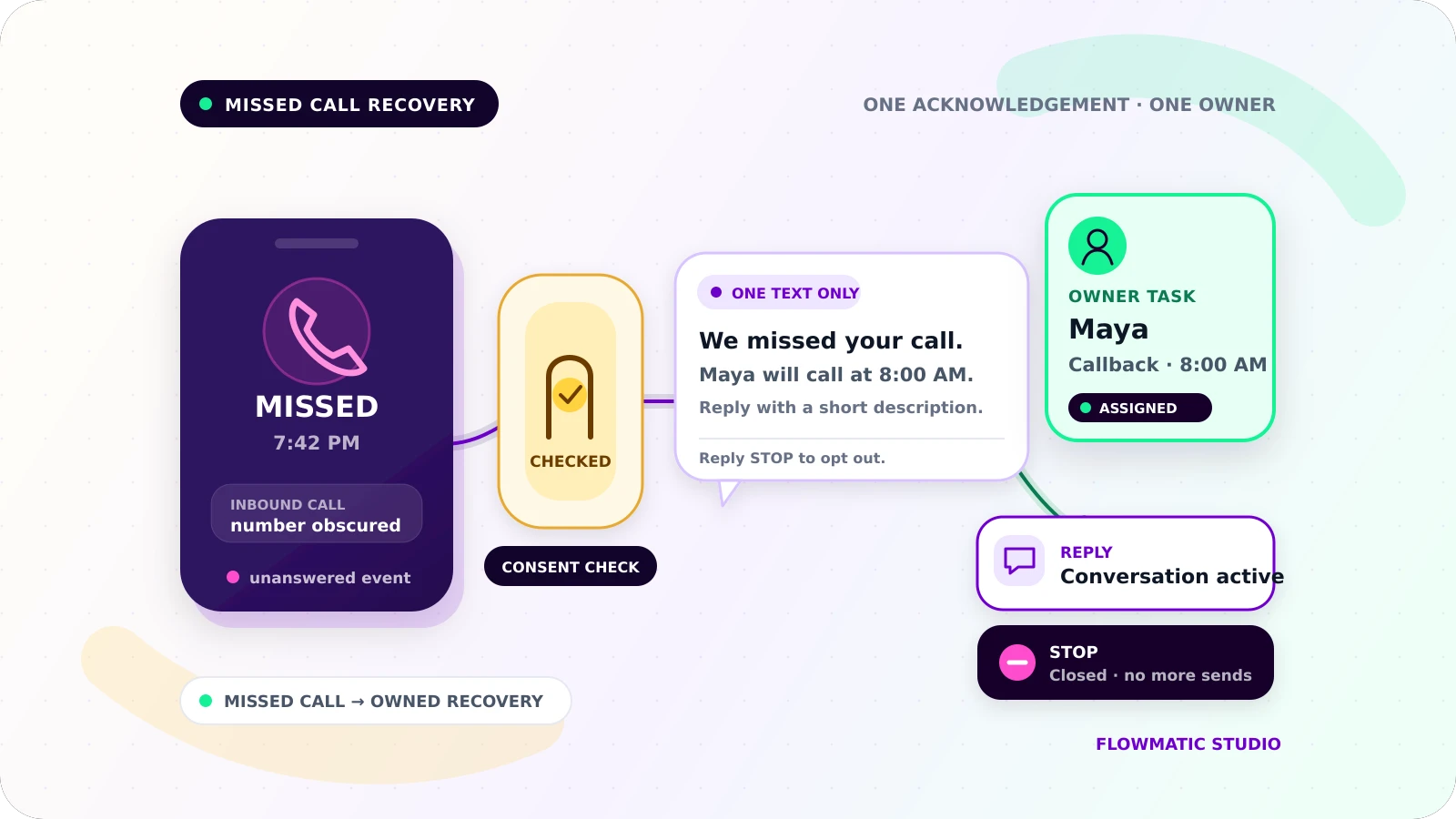
A missed call should create a recoverable task, not a stream of automated messages. For a small service business, useful missed call text back automation has a narrow job: detect an unanswered call, check whether a text is appropriate, send one acknowledgement, assign the callback, and stop when the caller replies or opts out.
This is one entry point into the lead process. The broader small-business workflow automation guide covers inquiries from several sources; this workflow starts with a missed inbound call.
Define a missed call before triggering anything
Do not treat every completed phone event as missed. A call can reach a person, voicemail, an IVR, or a forwarding destination. Your phone platform should provide the final disposition used by the workflow. For example, Twilio documents separate completed, busy, no-answer, and failed call states, while noting that completed only proves a connection was established and may include voicemail or an IVR.[5]
Write down the rule. A useful definition is: an inbound call to a tracked business number ended without a staff member answering, and no text-back workflow exists for that event.
Capture the provider event ID, caller and receiving numbers, timestamp and timezone, final disposition, routing result, voicemail indicator when available, and matching customer record. Use the event ID to prevent a retried webhook from sending twice. Suppress exceptions such as blocked caller IDs, known spam, numbers that cannot receive SMS, active conversations, recent duplicates, and anyone marked do not contact.
Put the consent check before the send step
A call is not blanket permission for automated marketing texts. Rules depend on the jurisdiction, message purpose, technology, consent record, and caller relationship. In the United States, the FCC says autodialed calls or texts to wireless numbers generally require prior oral or written consent, and commercial texts require written consent.[1] CTIA's voluntary guidance also expects businesses to obtain consent, retain relevant records, and let consumers revoke it.[2]
Before launch, have qualified counsel or the messaging provider confirm the rule for each location and use case. Store the approved policy in the workflow.
If the business has a documented basis to send this transactional acknowledgement, continue. If consent is missing, unclear, withdrawn, or outside the approved use case, create a callback task without texting. Keep promotions out of the acknowledgement; it should address the call, not enroll the person in a campaign.
Record the policy version, consent status, source, and decision time.
Send one acknowledgement during business hours
The message should identify the business, refer to the missed call, explain the next step, and provide a clear opt-out without guessing why the person called.
Hi, this is Northside Plumbing. We missed your call at 2:15 p.m. Maya will call you back before 4:00 p.m. If you prefer, reply with your postcode and a short description. Reply STOP to opt out.
Set the expectation from staffing rules. Do not promise a five-minute response if the team cannot deliver it.
During open hours, send promptly and set a callback due time. After hours, use the caller's local time when known. Queue the acknowledgement for the next permitted window or use an approved version that says when the business reopens. Quiet-hour rules vary by jurisdiction and provider, so keep the schedule configurable.
Give the recovery attempt an owner
Sending a text is not the outcome. The same event should create or update one lead record and assign a named owner.
Track the caller and matched contact, missed-call time and source number, consent decision, message status, owner, callback deadline, latest reply, opt-out state, next action, and final outcome.
Useful statuses include Acknowledgement queued, Owner callback due, Conversation active, Stopped, and Closed. If routing fails, assign a default owner and surface the exception. A shared-inbox alert is not an owner.
A CRM is useful when the business already uses one. A Google Sheet can work for a small team if each missed call has one dependable row. Google's Sheets API can append structured values to the next row of a detected table.[4] Update that row as the status changes, and keep message events in a separate log or linked history.
Make replies and STOP end the automation
An inbound SMS webhook can pass the sender, recipient, body, and message ID into the workflow.[6] Match the reply to the open missed-call record, cancel any queued acknowledgement or reminder, change the status to Conversation active, and notify the owner with the full message.
Route questions about price, emergencies, scope, or technical details to a person. If a classifier is uncertain, create an owner task.
Handle opt-out before every other branch. CTIA guidance says senders should recognize standard and natural-language opt-out requests, confirm the opt-out, and send nothing afterward.[2] Provider behavior still needs testing. Twilio recognizes several standard English keywords on long-code numbers, and Advanced Opt-Out can report matched STOP, START, or HELP events to the webhook.[3]
Store the suppression at the scope required by the approved policy and provider setup. Check it immediately before every send so a delayed CRM sync cannot reopen messaging.
Close the loop without an endless sequence
For this workflow, one acknowledgement is enough. With no reply, the owner's callback task remains. Do not convert silence into a daily text sequence.
Close the record as Reached, Booked, Not a fit, Wrong number, Opted out, or No contact. Measure eligible calls acknowledged, on-time assignment, overdue callbacks, booked jobs, opt-outs, duplicate sends, and delivery or sync failures.
Message counts and dashboard views are activity. Track whether each legitimate missed call reached an owner and a resolution.
Example: an after-hours plumbing call
At 7:42 p.m., a homeowner calls Northside Plumbing. Nobody answers. The workflow receives the approved missed-call disposition and finds no open conversation, duplicate, or suppression record.
The business's reviewed policy permits an after-hours acknowledgement, so one text identifies Northside Plumbing, says the office will respond at 8:00 a.m., and asks for a postcode. A callback task is assigned to Maya for opening time.
The homeowner replies, "Slow leak under the kitchen sink, postcode 10001." The reply changes the record to Conversation active and puts the text on Maya's task. She calls in the morning and books a visit. The record closes as Booked, with no more automated texts.
If the caller had replied "don't text me," the opt-out branch would have recorded suppression, sent only the configured confirmation allowed by provider policy, and cancelled pending messages.
Test the messy paths before launch
Test an answered call, voicemail, withheld caller ID, non-mobile number, duplicate webhook, open conversation, missing consent, after-hours event, timezone boundary, immediate reply, natural-language opt-out, STOP keyword, failed send, failed CRM update, and owner assignment failure.
Verify the message that should send and the message that must not. Then confirm the owner, deadline, suppression state, audit trail, and final status. Run a small monitored pilot before adding numbers or locations.
For the later handoffs, see the client onboarding automation guide and Flowmatic's live structured client-intake example.
If missed calls still disappear into a call log or trigger inconsistent follow-up, request a Flowmatic workflow audit. We will map the call event, consent gate, text acknowledgement, owner task, and stopping rules before recommending a build.
Sources
- [1] https://www.fcc.gov/consumers/guides/stop-unwanted-robocalls-and-texts — Stop Unwanted Robocalls and Texts
- [2] https://api.ctia.org/wp-content/uploads/2023/05/230523-CTIA-Messaging-Principles-and-Best-Practices-FINAL.pdf — CTIA Messaging Principles and Best Practices
- [3] https://www.twilio.com/docs/messaging/tutorials/advanced-opt-out — Twilio Advanced Opt-Out
- [4] https://developers.google.com/workspace/sheets/api/reference/rest/v4/spreadsheets.values/append — Google Sheets API values.append
- [5] https://www.twilio.com/docs/voice/api/call-resource — Twilio Call resource
- [6] https://www.twilio.com/docs/messaging/guides/webhook-request — Twilio incoming message webhook request
Recover missed calls safely
Map the call, consent, and callback handoffs
Flowmatic can map the missed-call event, consent gate, text acknowledgement, owner task, and stopping rules before recommending a build.
Request a workflow audit