A new enquiry arrives while one salesperson is on a job, another only covers the north side, and the owner is already handling three urgent callbacks. Sending the same alert to everyone does not solve the assignment problem. It leaves the team to decide who should act, often after the customer has started waiting.
Lead routing automation for small businesses should make one decision clear: who owns this enquiry now? A useful first system uses a short set of rules, records its choice, and keeps unmatched enquiries visible. It does not need predictive scoring or a large CRM project.
Capture only fields that can change the route
The routing decision can only use information the business collects consistently. Start with fields that affect eligibility or workload:
- requested service or enquiry type
- postcode, town, or service area
- preferred date or urgency band
- language or other genuine service requirement
- lead source and submission time
- existing customer or account owner, when relevant
- contact details and a short description
Use controlled choices for fields that drive rules. Boiler repair is routable; a free-text note saying "something is wrong with the heating" may need review. Keep the original message so the owner can see the customer's words. Give each enquiry a unique ID before routing.
Put the routing rules in a fixed order
Rules need precedence. Without it, the same enquiry may match several people and produce a different answer depending on which condition runs first.
A small service business can use this order:
- Apply hard exclusions. Remove anyone who cannot take the service, location, language, or required appointment type.
- Respect continuity. If an existing customer has an active owner and that owner is eligible, keep the relationship with them.
- Match the service. Route specialist work only to people approved for that category.
- Match the location. Use written territories, postcodes, or travel limits rather than an informal idea of who is "nearby."
- Check availability. Exclude people who are off shift, away, or blocked for the relevant response period.
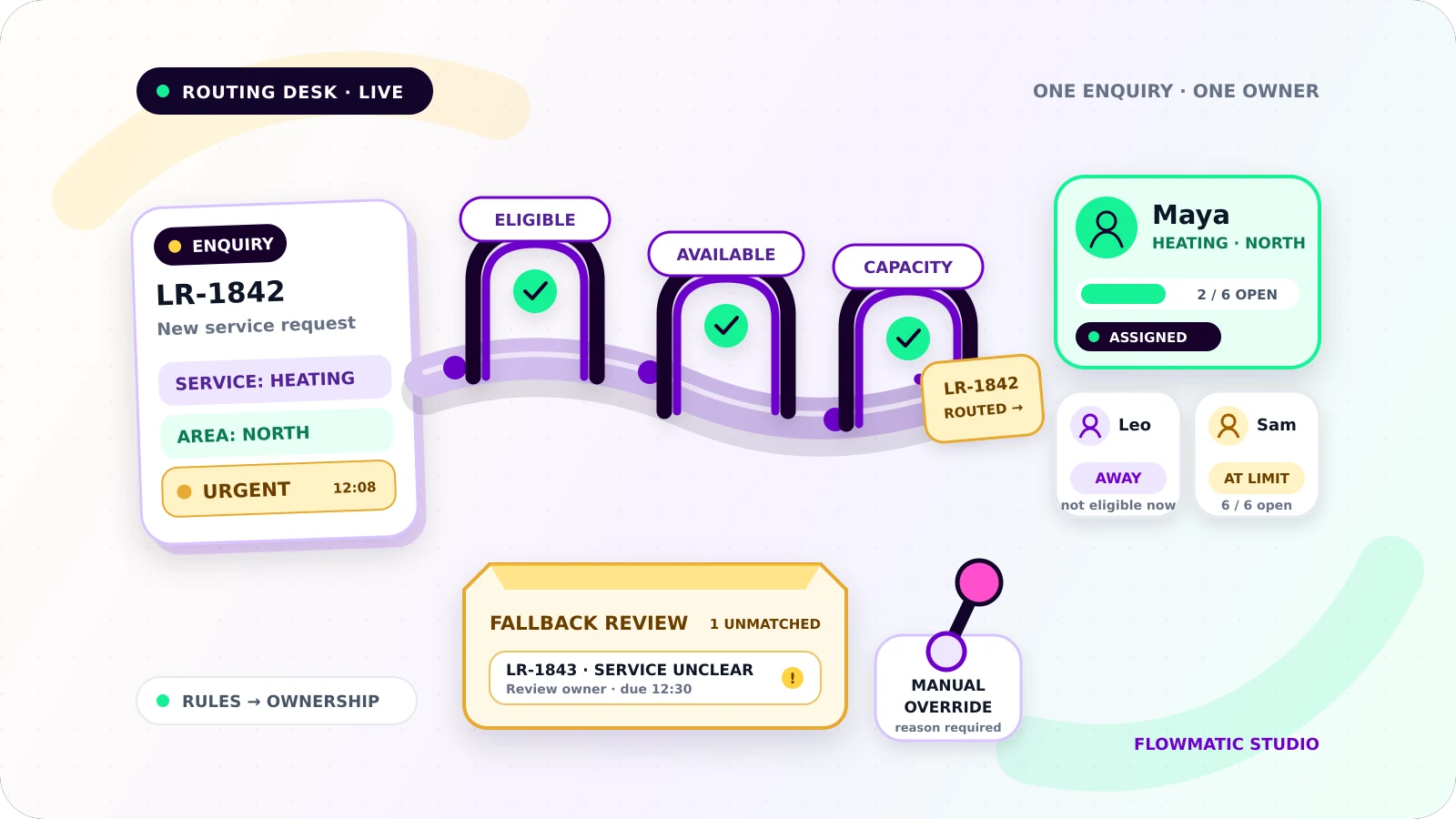
- Check capacity. Among eligible people, choose someone below the agreed open-lead limit.
- Break a tie predictably. Use round robin, lowest current load, or a fixed primary owner.
Keep the rules in a table with a priority, conditions, selected owner or team, effective dates, and a fallback. The first complete match wins. If two rules at the same priority can win, fix the table.
Treat availability and capacity as separate checks
Availability answers whether someone can respond during the required period. Capacity answers whether they should receive more work.
A person can be available but already carrying the team's maximum number of open enquiries. Another can have spare capacity but be unavailable until tomorrow. Store both states and define who may change them. A shared calendar may help with availability, while a count of owned enquiries in active statuses can represent capacity.
Capacity might be a maximum open-lead count for each person, reviewed weekly. Do not create a scoring model the team cannot check.
Make assignment an owned handoff
A routing result should create one owner, one next action, and one response deadline. For example:
Enquiry LR-1842 / owner: Maya / action: call to confirm survey / due: 14:30
Notify the owner through a channel they monitor. Include the enquiry details, deadline, and a direct record link. The customer confirmation should give an honest response window without naming someone whose assignment may change.
For time-sensitive work, add an acceptance step. The owner accepts, declines with a reason, or lets the acceptance timer expire. Acceptance confirms responsibility; opening an email does not. A decline should return the enquiry to routing with the prior owner and reason recorded.
Set one response target and an escalation path
Define an internal response target for each useful enquiry class. Write down when the clock starts, which business hours apply, and what stops it. Assignment should not stop the clock if the requirement is a first human call.
Before the deadline, remind the current owner if no qualifying action is recorded. At the deadline, escalate to a named backup or manager. Re-read the current record immediately before any reminder or escalation so a recent call, reassignment, closure, or opt-out prevents a stale action.
The escalation should not create a second owner. Transfer ownership explicitly, or keep the original owner while assigning a separate escalation task. The team must know which model it uses.
Keep a fallback queue and manual controls
Some enquiries will not match. A postcode may be outside known territories, every eligible person may be at capacity, or the service choice may be unclear. Put these records in a fallback queue with a named queue owner and a review deadline.
Each item should show the enquiry, unmatched condition, attempted rules, age, and next action. Send an alert as well, but treat the queue as the durable work list.
Staff need safe manual controls to assign, reassign, return to queue, pause, or close an enquiry. Require a reason for overrides and preserve the automated recommendation. A manual assignment should not be silently reversed when the routing job runs again.
Store enough history to explain a decision
For each routing attempt, keep:
- enquiry ID and received time
- normalized routing inputs
- rule-set name and version
- rules evaluated and winning rule
- eligible owners considered
- availability and capacity values used
- assigned owner, assignment time, and deadline
- acceptance, decline, reassignment, and escalation events
- override actor and reason
- final outcome or unresolved exception
Restrict access and retain only what the business needs. The history should answer "Why did Maya receive this?" and "Why did this stay unassigned?" without server logs.
Test the collisions before launch
Build a small test matrix from real routing situations. Include one enquiry for every service and territory, plus cases where:
- two rules match at once
- the usual owner is away
- the only specialist is at capacity
- all eligible owners are unavailable
- an existing customer requests a different service
- required routing data is missing or invalid
- an owner declines or does not accept
- a manager overrides the assignment
- the same enquiry is delivered twice
- a response lands seconds before escalation
For each test, confirm there is one active owner at most, one visible deadline, one recorded reason, and a recoverable fallback when no rule wins. Run the test again after changing the rule table.
Start with one enquiry source, a short rule table, and a daily review of the fallback queue. Once staff trust the assignments and exceptions, add another source or refine capacity. For the wider capture-to-follow-up structure, read Flowmatic's small-business workflow automation guide. If the intake record itself is unreliable, fix that boundary first with the form-to-CRM automation guide.
If new enquiries still depend on group alerts and whoever notices first, request a Flowmatic workflow audit. We will map your routing fields, rule order, ownership, response target, fallback queue, and override path before recommending a build.
Make enquiry ownership immediate
Map a routing system your team can trust
Flowmatic can map your routing fields, rule order, ownership, response target, fallback queue, and override path before recommending a build.
Request a workflow audit