
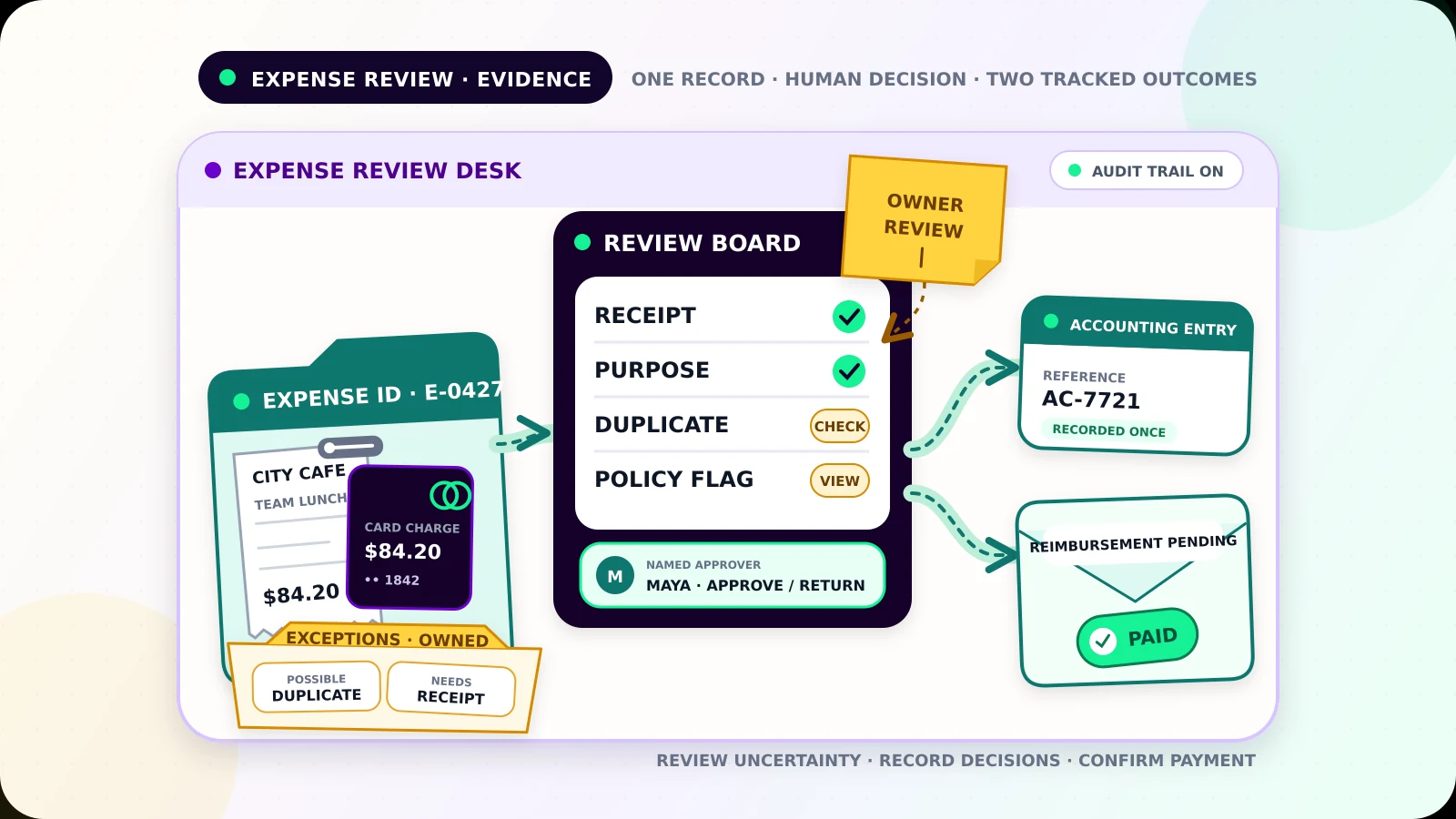
A card charge appears on Tuesday. The receipt sits in a pocket, the business purpose is in a chat, and nobody knows whether the owner approved reimbursement. By month-end, the bookkeeper has to rebuild the story.
Expense report automation for small businesses should prevent that scramble. The useful outcome is one expense record that links the purchase, receipt evidence, policy checks, approval, accounting handoff, and reimbursement status. If something is uncertain, the workflow should stop and show who must resolve it.
This internal process is separate from invoice reminder automation, which follows up on customer debt, and job-completion-to-invoice automation, which creates customer billing from finished work.
Capture the expense while the context is fresh
Give employees and owners one approved submission route. A short mobile form can collect a receipt photo or file plus a few structured fields:
- submitter and employee or owner ID
- merchant, transaction date, amount, currency, and payment method
- expense category and business purpose
- project, customer, or cost-center reference when relevant
- whether reimbursement is requested
- attendees or trip details when company policy requires them
Keep the original receipt file and link it to the record. Optical character recognition can propose values, but the submitter should confirm them. Low-confidence extraction, an unreadable receipt, or an amount mismatch belongs in review.
Do not assume one receipt proves every required fact. The IRS notes that supporting documents for a business expense should identify the payee, amount, proof of payment, date, and what was purchased or received, and that several documents may be needed to substantiate all elements.[1] Its travel, gift, and car guidance also calls for a written record plus documentary evidence such as receipts, bills, or canceled checks, subject to stated exceptions.[2] Requirements differ by country and expense type, so use a field list approved by your accountant rather than copying a generic tax checklist.
Build one record before checking policy
Assign a stable expense ID when a submission arrives. Store the evidence, values, source transaction reference, state, and history under that ID.
A practical state model is:
Draft: the submitter has not finishedSubmitted: required intake fields are presentNeeds evidence: a receipt or explanation is missingPolicy review: a rule raised a flagAwaiting approval: a named approver must decideApproved for handoff: ready for accountingRecorded: accounting returned a durable referenceReimbursement pending: the employee is still owedPaid: payment is confirmedException: processing failed or the record conflicts with another item
Keep Recorded and Paid separate. Posting an expense to accounting does not prove that an employee received reimbursement.
Catch duplicates before approval
The same expense may arrive through a form, a card feed, and a forwarded email. Compare candidate records using the amount, currency, merchant, date, card transaction ID, submitter, and receipt fingerprint. An exact provider transaction ID is strong evidence. A matching amount and merchant alone is only a warning.
Label possible matches as duplicate candidates and show both records together. Do not merge automatically when tips, split bills, recurring subscriptions, or multiple employees could explain the match. On a retry, the stable expense ID should return the existing result instead of creating another accounting entry.
Use policy checks as flags, not verdicts
Turn the written expense policy into visible checks: receipt required, category allowed, spending limit, approved payment method, valid project code, submission deadline, required pre-approval, or missing business purpose.
Most checks should produce a reasoned flag, not an accusation or tax decision. Amount exceeds the team meal limit is useful. Fraudulent expense is not a safe automated conclusion. The reviewer can approve an exception, return the item, reject it under company policy, or request evidence.
Rules need versions and effective dates. Save the rule version used for each decision so an old report is not silently judged against a new policy.
Give approval to a named person
Route by amount, category, team, or project, but always resolve the rule to a named approver and backup. Owners should not approve their own expense unless the business has explicitly chosen and documented that process.
The approval view should show the receipt, purpose, payment source, policy flags, possible duplicates, and proposed accounting category. Record the approver, time, decision, and reason. A chat reaction is easy to lose.
Use clear stops. Do not send an expense to accounting when evidence is missing, a duplicate is unresolved, approval is absent, the submitter changed a material field after approval, or the accounting destination cannot be verified.
Hand off to accounting or Sheets once
Map only approved fields into the accounting platform or a controlled Google Sheet. Keep source and destination IDs in both directions when the tools allow it. If a write times out, search for the expense ID before retrying.
For a Sheet-based first version, restrict edit access to people who maintain the ledger. Google Drive supports viewer, commenter, editor, and owner roles, and folder access can be inherited by files inside it.[3] Google Sheets also provides version history and cell edit history, although Google notes that some changes do not appear in cell history.[4] Those features help with recovery, but they do not replace an explicit approval log.
Never copy full card numbers, bank credentials, or unrelated personal information into the tracker. Limit access to people who submit, approve, reimburse, or reconcile expenses. Review access when roles change, and set retention rules with qualified advice.
Track reimbursement through confirmation
For personally paid expenses, create a reimbursement item only after approval and accounting handoff. Track the payee, approved amount, currency, payment method, scheduled date, payment reference, and status.
A bank file created or payment marked Scheduled is not final. Move the record to Paid only after verified payment. If payment fails, reopen the item with an owner and next action. Mark company-card charges Company paid so they cannot enter the reimbursement queue.
Make exceptions visible every day
Use one work queue for missing receipts, unreadable evidence, field mismatches, suspected duplicates, policy flags, absent approvers, changed records, failed accounting writes, and failed reimbursements. Each item needs the expense ID, failed step, reason, evidence link, owner, first-failure time, and dated next action.
Limited retries are reasonable for temporary service outages. Missing evidence, policy questions, and duplicate candidates need a person. The workflow should never hide them in an integration log.
Test the failure paths before launch
Test a normal company-card expense, personal reimbursement, missing receipt, unreadable receipt, split receipt, foreign currency, tip added after authorization, recurring merchant with equal charges, duplicate submission, changed amount after approval, approver absence, accounting timeout before and after creation, Sheet permission failure, reimbursement failure, and two people editing the same record.
For each case, verify the state, accounting-entry count, evidence, approval history, reimbursement status, owner, and next action. Start with a small monitored batch. Expand only after the team can recover a failed handoff without duplicating an expense or payment.
If expense processing still depends on receipts in messages and a month-end spreadsheet scramble, request a Flowmatic workflow audit. We will map the intake fields, policy flags, approvals, accounting handoff, reimbursement states, and exception ownership before recommending a build.
Sources
- [1] https://www.irs.gov/businesses/small-businesses-self-employed/what-kind-of-records-should-i-keep — What kind of records should I keep | Internal Revenue Service
- [2] https://www.irs.gov/publications/p463 — Publication 463 (2025), Travel, Gift, and Car Expenses | Internal Revenue Service
- [3] https://support.google.com/docs/answer/2494822 — Share files from Google Drive | Google Docs Editors Help
- [4] https://support.google.com/docs/answer/190843 — Find what's changed in a file | Google Docs Editors Help
Replace month-end expense reconstruction with one reliable workflow
Map receipts, policy checks, approvals, accounting, and reimbursement
Flowmatic can map your expense workflow before recommending a build, including evidence fields, review rules, approvals, accounting handoff, reimbursement states, and human exceptions.
Request a workflow audit