A review request should be triggered by a completed customer experience, not by a calendar guess or an employee deciding who seems happy.
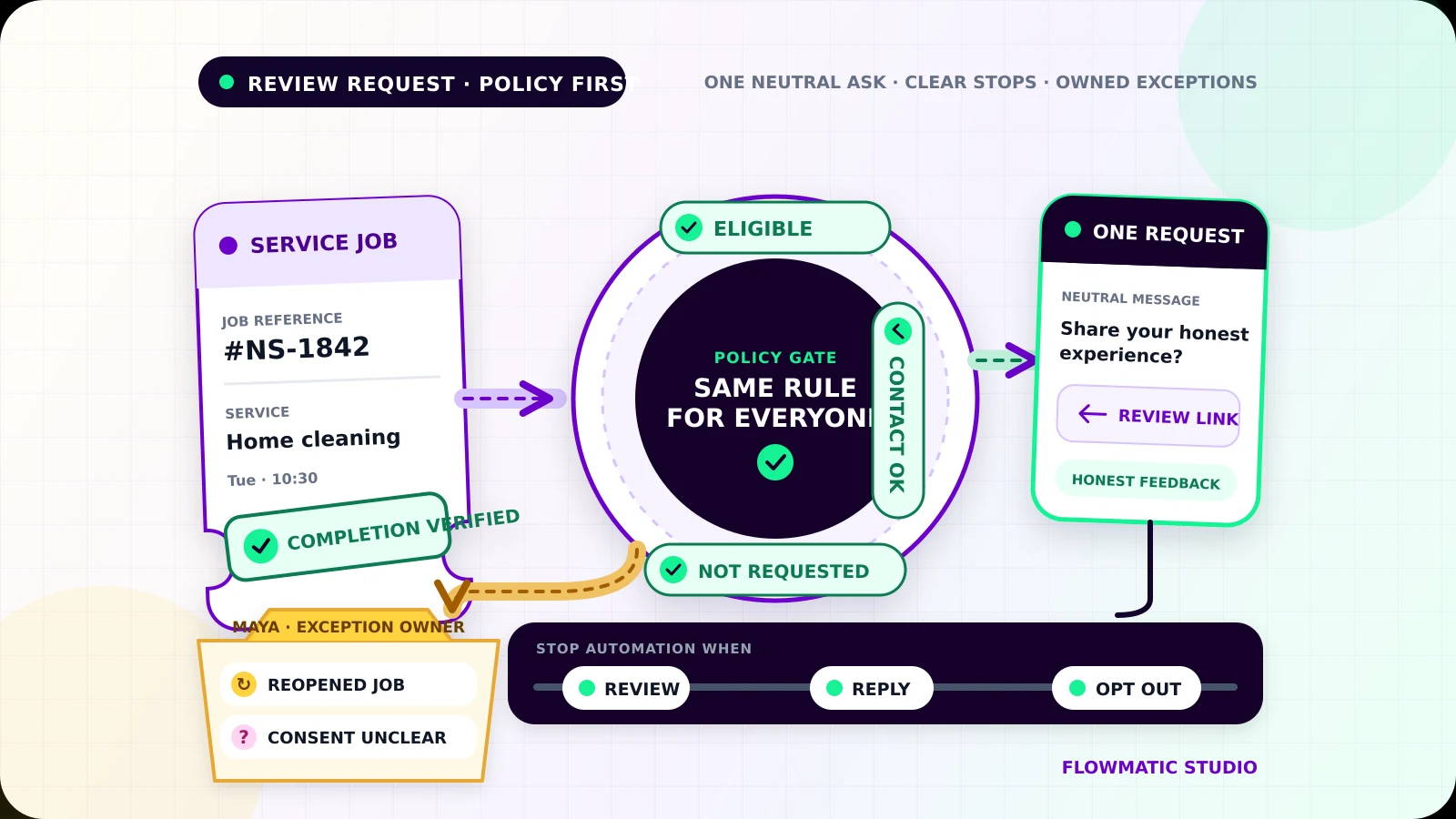
Useful review request automation checks that the work is genuinely complete, applies the same eligibility rules to every customer, confirms the contact channel is appropriate, sends a neutral request, and stops when the customer reviews, replies, or opts out. Anything uncertain goes to a named owner.
Start with verified completion
The trigger should come from the system that proves delivery: a closed work order, completed appointment, delivered project, or fulfilled order. A date alone is weak evidence. Jobs run late, invoices close before the work ends, and staff can mark a status incorrectly.
Define what completion means for one service. A home-cleaning company might require the visit to be marked complete by the assigned cleaner with no open return visit. A consultant might require the final deliverable to be sent and accepted. Store the completion event, time, source record, and person or system that confirmed it.
Add a short delay when it helps the customer use the result, but calculate it from verified completion. Re-check the source record immediately before sending. If the job reopened, a complaint appeared, or the status cannot be confirmed, pause the request and assign an owner.
Apply one eligibility policy consistently
Create a written rule that can be explained to staff and customers. A customer may be eligible when:
- the service was completed and the record belongs to a real customer
- the customer has not already received a request for that job
- the contact method is allowed under the business's policy
- no open operational issue requires a person first
- the address or number is not suppressed
An open complaint can pause the workflow because the team needs to respond, but it must not become a filter that permanently sends only satisfied customers to Google. Once the issue is resolved, the same policy should decide whether the customer remains eligible.
Google allows businesses to encourage reviews that reflect genuine experiences. Its policy prohibits incentives, pressure, discouraging negative reviews, and selectively soliciting positive reviews.[1] Google also provides a Business Profile review link or QR code that businesses can share with customers.[2]
Do not ask, "Were you happy?" and send only positive answers to the public review page. That is review gating. Use the same direct, neutral route for every eligible customer.
Check permission for the actual channel
A customer record is not automatic permission to send any message through any channel. Keep the review request tied to the completed service, and store the contact source, channel, permission or lawful basis used by the business, policy version, and any suppression state.
Rules vary by country, channel, message purpose, and sending technology. In the United States, the FTC's CAN-SPAM guidance says commercial email must include a clear way to opt out and that opt-out requests must be honored promptly.[3] FCC guidance says certain automated or prerecorded calls and texts require prior consent, with written consent required for commercial texts.[4] Have qualified counsel or the messaging provider confirm how those rules apply to your workflow.
If permission is missing or unclear, do not improvise. Create a manual review task or skip the message according to the approved policy. An employee should not copy the number into a personal phone to bypass the rule.
Send a neutral request with a direct link
The message should identify the business, refer to the completed service, ask for honest feedback without suggesting a rating, and make the action optional.
Thanks for choosing Northside Cleaning for your service on Tuesday. If you would like to share your experience, you can leave an honest Google review here: [review link]. If anything still needs attention, reply to this message and Maya will help. Reply STOP to opt out of messages where applicable.
Do not offer a discount, prize, free item, or entry into a draw in exchange for a review. Do not ask for five stars, name a staff member the customer should praise, or give suggested review text. Keep the review link attached to the correct location when the business has more than one profile.
Send only after the customer record and send decision are saved. Give each request a unique key such as completed job ID + review request version. A retry should find the first attempt instead of sending a duplicate.
Use one restrained follow-up
A follow-up can help when the first message was delivered but ignored, but the sequence should remain short. One reminder after the business's chosen interval is enough for many small teams.
Before that reminder, re-check completion, eligibility, delivery, suppression, replies, and any known review event. Stop when the customer has reviewed, replied, opted out, raised an issue, received the maximum number of requests, or entered an uncertain state.
Review detection may not be reliable in every tool. Do not claim that a click proves a review was posted, and do not guess which reviewer matches a customer. When the platform cannot confirm the event safely, use a conservative message limit and let staff close matched records manually.
A reply always pauses automation. "The work is fine, but I cannot open the link" needs help. "Please stop" needs suppression. A complaint needs an owner, not another review request.
Route exceptions to one named owner
The exception view should show records that could not proceed safely: reopened jobs, duplicate completion events, missing contact permission, bounced messages, ambiguous replies, location mismatches, opt-outs that failed to synchronize, and customers who appear to have two active request schedules.
Each item needs the customer and job reference, failed step, reason, request history, owner, and dated next action. The owner can retry, suppress, correct the profile link, confirm eligibility, or close the item. Keep those decisions in the audit history.
Test the stops before launch
Test a normal completed job, delayed completion, reopened work, unresolved complaint, missing permission, prior opt-out, duplicate event, wrong location link, failed delivery, immediate reply, review recorded before the reminder, ambiguous reviewer identity, and a retry after timeout.
For every case, count the messages sent and confirm the eligibility result, owner, next action, stop reason, and suppression state. Start with a monitored batch. The goal is a consistent request process for genuine customers, not a target number of positive reviews.
Flowmatic's Google Review and Lead Follow-up Engine is designed around an equal request process, honest feedback, visible ownership, and no review gating. For the wider foundation of triggers, ownership, and exception handling, read the small-business workflow automation guide.
If review requests still depend on staff memory or selective judgment, request a Flowmatic workflow audit. We will map completion evidence, eligibility, contact rules, stop conditions, and exception ownership before recommending a build.
Sources
- [1] https://support.google.com/contributionpolicy/answer/7400114?hl=en — Prohibited & restricted content | Google Maps User Generated Content Policy
- [2] https://support.google.com/business/answer/3474122?hl=en — Tips to get more reviews | Google Business Profile Help
- [3] https://www.ftc.gov/business-guidance/resources/can-spam-act-compliance-guide-business — CAN-SPAM Act: A Compliance Guide for Business | Federal Trade Commission
- [4] https://www.fcc.gov/consumers/guides/stop-unwanted-robocalls-and-texts — Stop Unwanted Robocalls and Texts | Federal Communications Commission
Replace memory and selective judgment with a consistent process
Map completion evidence, contact rules, stops, and exception ownership
Flowmatic can map your review request workflow before recommending a build, including eligibility, channel rules, idempotency, stop conditions, and human exceptions.
Request a workflow audit