
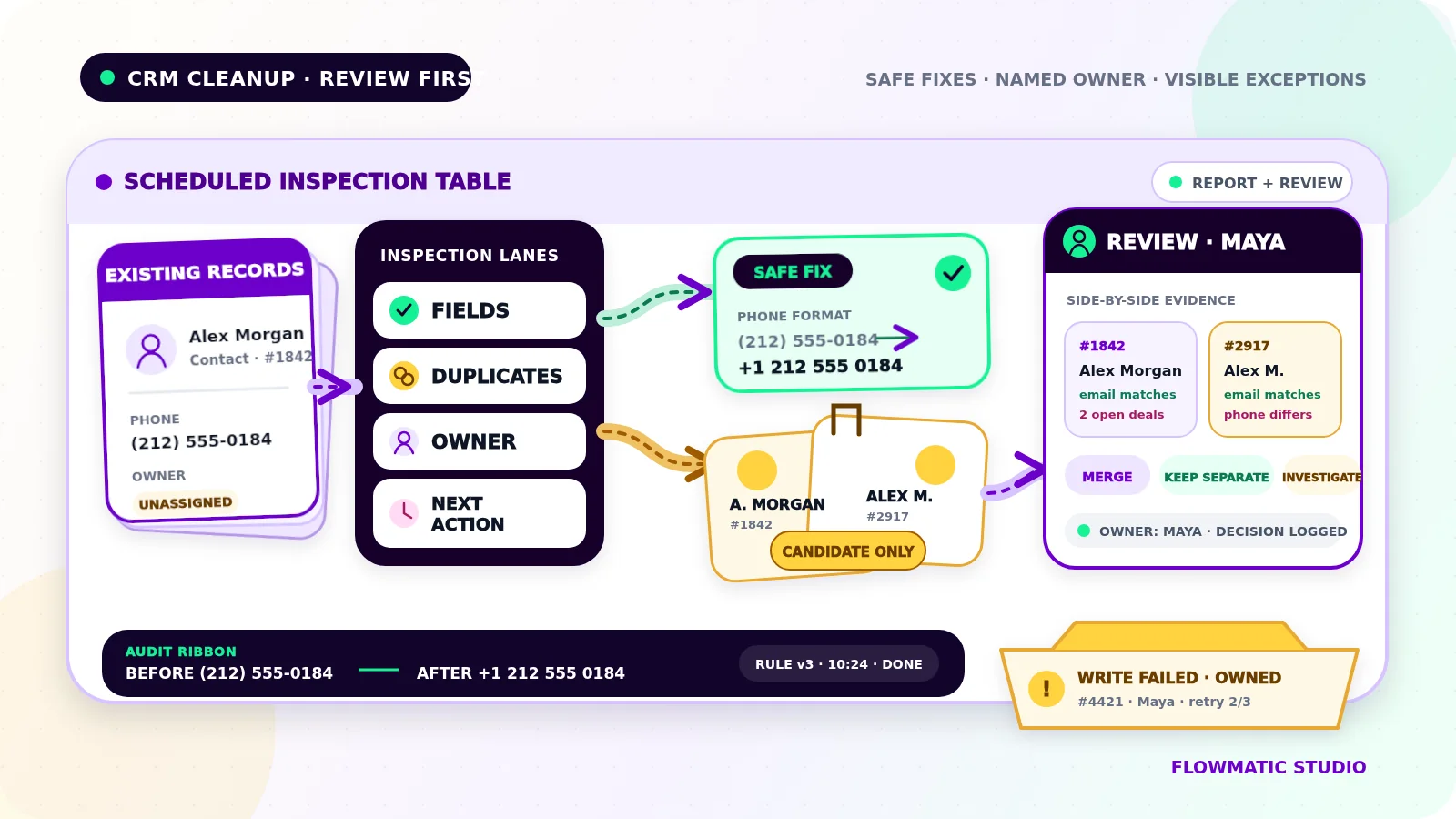
A CRM can look busy while becoming less useful every week. The same customer appears twice, old leads still belong to former employees, phone numbers use five formats, and overdue next actions disappear inside a long list.
CRM data cleanup automation should not solve that problem with a blind bulk delete. Its job is to inspect records on a schedule, make only predictable low-risk corrections, and send uncertain changes to a person with enough context to decide safely.
This workflow maintains data that already exists. It is separate from the form-to-CRM handoff, which controls how new submissions enter the system.
Define the scope and source of truth
Start with one record type, such as contacts or open leads, and a written cleanup policy. Do not begin by scanning every object and rewriting every field.
For each field, name the system that owns the value. The CRM may own lead status and assignment, while billing owns the legal customer name. When systems disagree, the cleanup job should not guess.
A practical field policy should state:
- whether the field is required
- the accepted format or allowed values
- which system or person owns it
- which correction is safe to automate
- which condition requires review
- whether the original value must be retained
Run the first version in report-only mode. It should find issues without changing records so the team can judge the rules against real data.
Validate fields without inventing information
Field validation is the safest place to begin. Trim accidental spaces, standardize approved capitalization, and normalize phone or date formats only when the transformation is unambiguous and reversible.
Flag missing owners, invalid status values, impossible dates, malformed email addresses, and required fields that are blank. Do not manufacture a value to make a record pass. An unknown owner is still unknown; assigning every orphaned record to the business owner may hide a routing failure rather than resolve it.
Keep the original value, proposed value, rule name, and reason together so a reviewer has evidence and the correction can be reversed.
Detect duplicate candidates, not automatic merges
Duplicate detection produces candidates. It does not prove that two records are the same person or business.
Use several signals and weight them according to risk. An exact normalized email match may be strong, while a shared surname, company name, or phone number may not be. Families share details, businesses have branches, and one customer can have several legitimate opportunities.
Show both records side by side with matching and conflicting fields, related work, and the proposed survivor. Give each group a confidence band:
High confidence: strong identifiers agree and no protected fields conflictNeeds review: some signals agree, but identity or history is uncertainDo not merge: clear conflict, separate active work, or insufficient evidence
Even high-confidence candidates should begin in review mode. Automate a merge only after approving and testing a narrow rule and confirming that required relationships and history are preserved. Never delete a record merely because two names look similar.
Check ownership and stale next actions
A usable record needs somebody responsible for it and a dated next action when work is still open.
The scheduled cleanup can flag records with no owner, an inactive owner, an owner outside the approved team, or an open status with no next action. It can also flag next actions that are overdue, dated before the latest customer activity, or left unchanged beyond the business's review window.
Age alone should not close a record. A long sales cycle, paused project, or seasonal customer may be valid. Route stale records to a named reviewer with the latest activity, status, and proposed next step.
Separate safe corrections from risky changes
Use confidence thresholds based on the consequence of being wrong, not on a desire to clear the queue.
Low-risk automatic corrections might include trimming whitespace, mapping an exact deprecated status to its approved replacement, or filling a derived display field from a trusted source. Merges, deletions, ownership changes, consent changes, lifecycle-stage changes, and overwriting customer-provided details should normally wait for human approval.
Each review item should show:
- record links and stable IDs
- the rule that raised it
- current and proposed values
- matching and conflicting evidence
- affected tasks, deals, messages, or reports
- the available actions and the consequence of each
Make skip, not a duplicate, and needs investigation valid outcomes. A review queue that pressures staff to approve every suggestion is not a safety control.
Make every update idempotent and auditable
A scheduled job may be retried after a timeout or partial failure. Give every proposed change a stable key built from the record ID, rule version, and relevant source version. Before writing, check whether that exact correction already succeeded.
Re-read the current record immediately before applying an approved change. If the value, owner, status, or modification time changed after review, cancel the write and return it for a fresh decision. This prevents an old cleanup proposal from overwriting newer work.
For every run, record the time, policy version, records inspected, issues, changes, review decisions, failures, and actor. For each changed record, retain the before value, after value, reason, and result.
Keep exceptions visible and recoverable
A failed CRM read should stop the run, not produce a misleading clean report. A failed write should remain open with the record ID, failed step, error summary, attempt count, and named resolver.
Use limited retries for temporary failures. Do not restart the entire batch after partial success. Resume from persisted item states and the same idempotency keys. Quarantine records that repeatedly fail instead of letting them block every later run.
The operating view should separate new findings, awaiting review, approved and pending write, completed, failed, and dismissed items. Old exceptions need an owner and review date so the cleanup process does not create its own stale queue.
Test the failure paths before scheduling unattended changes
Build a test set containing exact duplicates, similar names that are different people, shared household details, multiple opportunities for one contact, missing and inactive owners, malformed fields, stale actions, and recently updated records.
Then test a timeout before and after a write, the same run launched twice, a rule change between review and execution, a CRM outage, a permission failure, and a reviewer approving an item that another employee just edited. Confirm that automatic changes happen once, uncertain records remain unchanged, conflicts return to review, and every result has an audit entry.
Start with a small monitored batch. Compare the proposed and completed changes with the live records before expanding the scope. The useful outcome is not a queue reduced to zero. It is a CRM the team can trust without losing valid history.
For related guidance on using clean fields in traceable management reporting, see Flowmatic's weekly KPI reporting automation guide.
If your CRM cleanup still depends on occasional exports and risky bulk edits, request a Flowmatic workflow audit. We will map the source-of-truth rules, safe corrections, review thresholds, audit history, and recovery path before recommending a build.
Replace risky bulk edits with a controlled review workflow
Map your CRM cleanup rules, review thresholds, and recovery path
Flowmatic can map the source-of-truth rules, safe corrections, review thresholds, audit history, and recovery path before recommending a build.
Request a workflow audit