
A customer asks for “one small addition” after work starts. The request reaches a technician by text, the office hears later, and the final invoice becomes an argument about what was approved.
Change order automation turns that proposed scope change into a documented decision, updates the plan only after approval, and gives billing usable evidence. It does not replace commercial judgment or the agreement governing the work.
Capture one request before work changes
Give staff one approved route for changes, even when the customer first asks by phone, email, or on site. A coordinator can record a verbal request, but must identify its source.
Give each change order a stable ID linked to the customer, agreement, project, and job version. Capture:
- requested work and the reason for the change
- items added, removed, or replaced
- labour, material, tax, and other cost effects
- schedule impact, dependencies, and revised completion date
- assumptions, exclusions, attachments, and expiry
- requester, review owner, approver, and billing reference
Describe the difference from the accepted scope, not the whole project. Photos, marked-up plans, and estimates can support the request, but should not be the only record.
Put a named owner between request and approval
A submitted request becomes Needs review, not Approved. One named person checks scope, price, availability, schedule, authority, missing information, and conflicts.
Use explicit states:
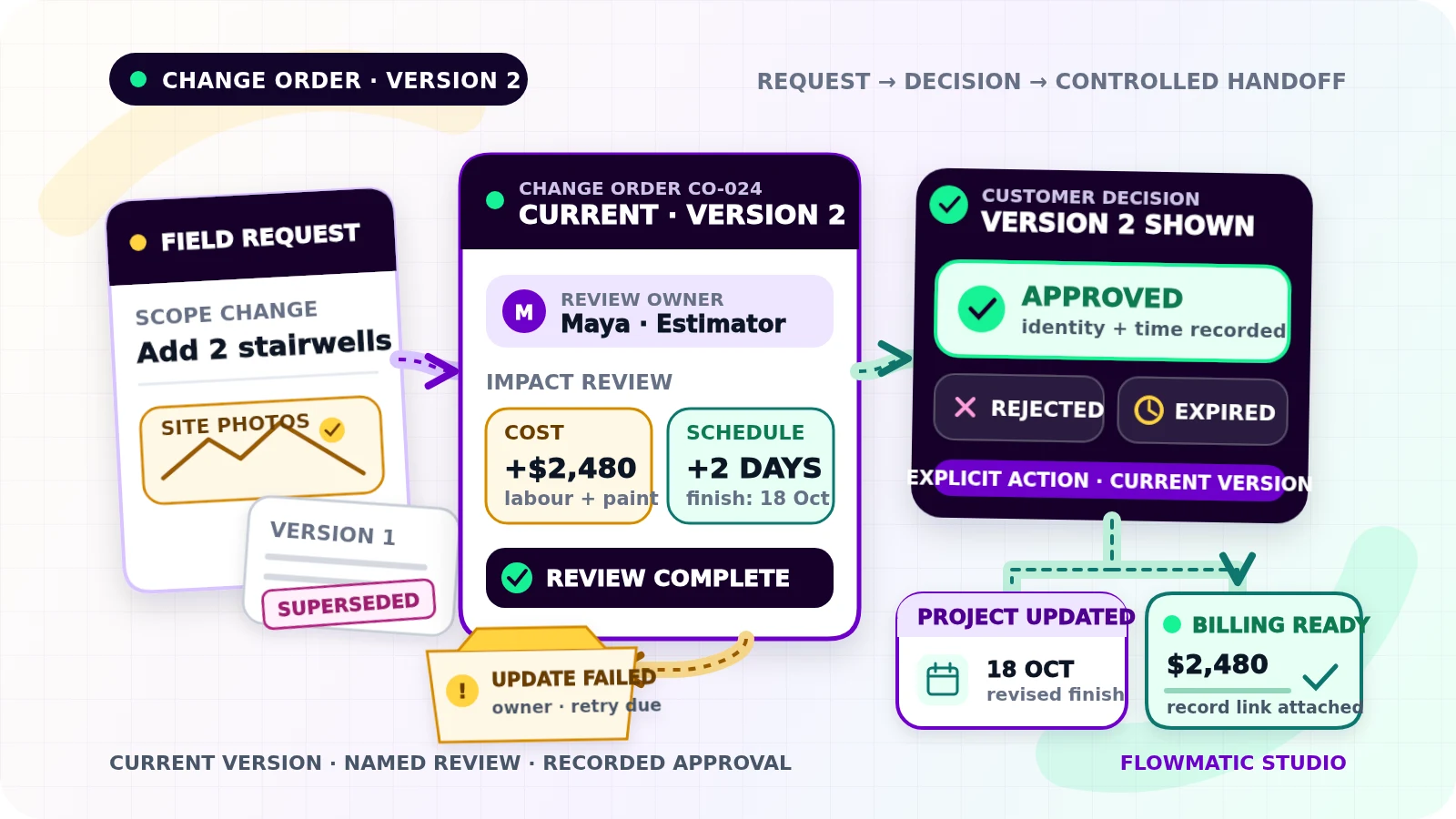
Draft: still being preparedNeeds review: waiting for an internal decisionSent for approval: customer has the current versionApproved: required approval evidence is recordedRejected: customer declined the proposalExpired: the approval window endedSuperseded: a newer version replaced itBilling ready: approved work has reached the defined billing checkpoint
Rejected, expired, and superseded requests stop reminders and cannot update the active plan. Changed terms require a new version.
Record approval evidence without making legal promises
Present the scope, price and schedule differences, expiry date, and clear approve or reject actions. Record the version shown, customer identity, action, timestamp, channel, and provider reference when available.
A reply such as “looks fine” may not satisfy the contract, local law, customer-authority rules, or e-signature policy. Define acceptable approval with qualified legal and accounting advisers. Automation preserves evidence; it does not declare an approval legally sufficient.
Before changing downstream records, re-check that the request is open and current. Keep internal review separate from customer approval.
Prevent duplicate requests and actions
Repeated webhooks, double-clicks, and retries must not create two change orders or apply one approval twice. Store the source event ID first. Give each state-changing action a key such as change order ID + version + action.
Stripe documents this safeguard for API requests: an idempotency key prevents a retry from performing the operation again.[1] Use the pattern even when Stripe is not involved.
Deduplication is separate. Two requests about the same room may be different changes. Flag likely matches, but do not merge them from wording alone.
Hand approved work to operations and billing
Approval triggers controlled updates. Put the approved scope, dependencies, owner, and revised dates on the project board. Put the decision and customer communication in the CRM. In Google Sheets, update the stable change-order row rather than appending one for every status; the Sheets API supports writing to a specified range.[2]
Keep one system authoritative per field. The project tool may own schedule and delivery status; accounting owns invoice and payment state. Link records instead of copying sensitive data into notes.
Define Billing ready precisely: perhaps approval plus material ordering, completion, or an accepted milestone. Send billing the approved amount, tax treatment for review, timing, invoice description, project code, and record links. Billing still verifies accounting treatment and creates or revises the invoice under policy.
This workflow ends at a billing-ready handoff. The separate job-completion-to-invoice workflow covers completion evidence, invoice creation, and duplicate-invoice controls.
Make exceptions visible
Use one exception view for missing scope, conflicting versions, unknown approvers, expired links, failed updates, billing mismatches, and partial success. Every item needs a reason, owner, failure time, retry count, and dated next action.
Keep an audit trail of creation, edits, versions, sends, views when available, decisions, updates, retries, overrides, and failures. Preserve prior values.
Example: a commercial painting contractor
A property manager asks a painting crew to add two stairwells. The supervisor records the request and photos. The estimator adds costs, records a two-day schedule impact, and sends version 1 for approval.
The customer removes one stairwell. Version 1 becomes Superseded; version 2 shows the new scope, price, and finish date. After approval through the accepted channel, the workflow records evidence, updates the project, and gives the crew only the approved instruction.
At the company’s checkpoint, the record becomes Billing ready. Billing receives the approved amount, description, and project link instead of reconstructing the change from messages.
Test the collisions before launch
Test duplicate submissions, simultaneous approvals, approval after expiry, rejection, superseded versions, missing authority, failed attachments, system outages, partial updates, manual retries, schedule conflicts, billing mismatches, and work against the wrong version.
Verify the active version, message count, decision evidence, project dates, billing status, owner, next action, and audit history. Start with human review and a few projects.
For ownership, state, and exception foundations, read Flowmatic’s small-business workflow automation guide.
If scope changes still live in texts, calls, and memory, request a Flowmatic workflow audit. We will map the approval and billing handoff before recommending a build.
Sources
- [1] https://docs.stripe.com/api/idempotent_requests — Stripe API: Idempotent requests
- [2] https://developers.google.com/workspace/sheets/api/reference/rest/v4/spreadsheets.values/update — Google Sheets API: spreadsheets.values.update
Keep scope changes documented and billable
Map your change-order approval and billing handoff
Flowmatic can map your request fields, version rules, approval evidence, schedule updates, billing checkpoint, and exception ownership before recommending a build.
Request a workflow audit