A WhatsApp inquiry can feel handled because someone saw it. Then the chat gets buried, nobody owns the next step, and the customer has to ask again.
Useful WhatsApp lead management automation turns an opted-in inbound message into one owned lead record with a status, deadline, and next action. The reply still happens in WhatsApp. The operational truth lives in your CRM or Google Sheet. For the broader lead-capture structure, see Flowmatic's small-business workflow automation guide.
Start with one source of truth
Use the system staff already maintain. If that is a CRM, create or update the contact and opportunity there. A Google Sheet can work for a small team when access is controlled and every lead has one dependable row. Google's Sheets API can append structured values after the last row of a detected table.[5]
Keep the contact record separate from the message-event log. The contact shows who owns the lead and what happens next. The log holds inbound and outbound messages, status changes, errors, and staff actions.
At minimum, store:
- phone number or WhatsApp ID, name, source, and requested service
- consent source, timestamp, and policy version
- owner, lead status, next action, and due time
- last inbound and outbound times, message status, and failure reason
- opt-out state and final outcome
Route inbound messages through a controlled pipeline
Meta sends incoming WhatsApp messages and outgoing message-status updates to a configured webhook endpoint.[2] A clean workflow processes each event in this order:
- Verify the webhook and save the raw event securely.
- Reject duplicates using the provider's message or event ID.
- Normalize the phone number and match an existing contact.
- Create or update one open lead record.
- Assign an owner, next action, and due time.
- Send an allowed acknowledgement or place the message in a human queue.
- Update delivery state when status webhooks arrive.
Save the lead before attempting the send. Otherwise, a CRM outage can leave a customer-facing reply with no internal task. If the CRM or Sheet is unavailable, hold the action in a retry queue and alert a named owner.
Meta's status webhooks distinguish events such as sent, delivered, read, and failed.[7] Treat sent as a transport state, not proof that a person read the message or that a lead was handled.
Prevent duplicate leads and duplicate replies
Build as if the same event will arrive twice. Use the WhatsApp message ID as the idempotency key, then use the normalized phone number or WhatsApp ID to find the contact. If that contact has an open inquiry for the same service, attach the message instead of creating another lead.
A returning customer asking about a new job may need a new lead linked to the same contact. Define an open-lead window and let staff split unclear cases.
Before sending, check an outbound key such as lead ID + action type + workflow version. Store the returned message ID so delivery updates attach to the correct action.
Make consent and opt-out part of the record
WhatsApp requires businesses to obtain opt-in before messaging people. The business name must be clear, the person must know they are agreeing to receive communication, and the method must comply with applicable law.[6] The policy also requires businesses to honor requests to stop or opt out.[4]
Record the basis for contact instead of using one unchecked "consent" box. Keep the source, time, and notice or policy version.
An inbound question is not blanket permission for promotions. Keep the reply tied to the inquiry. Process an opt-out before any other branch, cancel queued messages, mark the contact as suppressed, and notify the owner.
A user message opens a 24-hour customer service window. During that window, a business can send free-form service replies. Outside it, the business can only send an approved template message.[1][3] Store the last user-message timestamp and check the window immediately before sending, not when the workflow is first queued.
Give every lead a next action and an owner
New lead is not a useful stopping point. Use statuses such as Needs details, Qualified, Owner follow-up due, Conversation active, Booked, Opted out, and Failed - review required.
Each open record needs one person, one next action, and one due time: Maya / call / today 3:00 p.m. A team inbox is not an owner.
Escalate to a person when the lead asks about pricing exceptions, complaints, urgent or safety-sensitive work, custom scope, payment problems, or anything the workflow cannot classify confidently. Meta's policy permits automation during the service window but requires a clear path to human support.[4]
Example: a roofing inquiry becomes an owned task
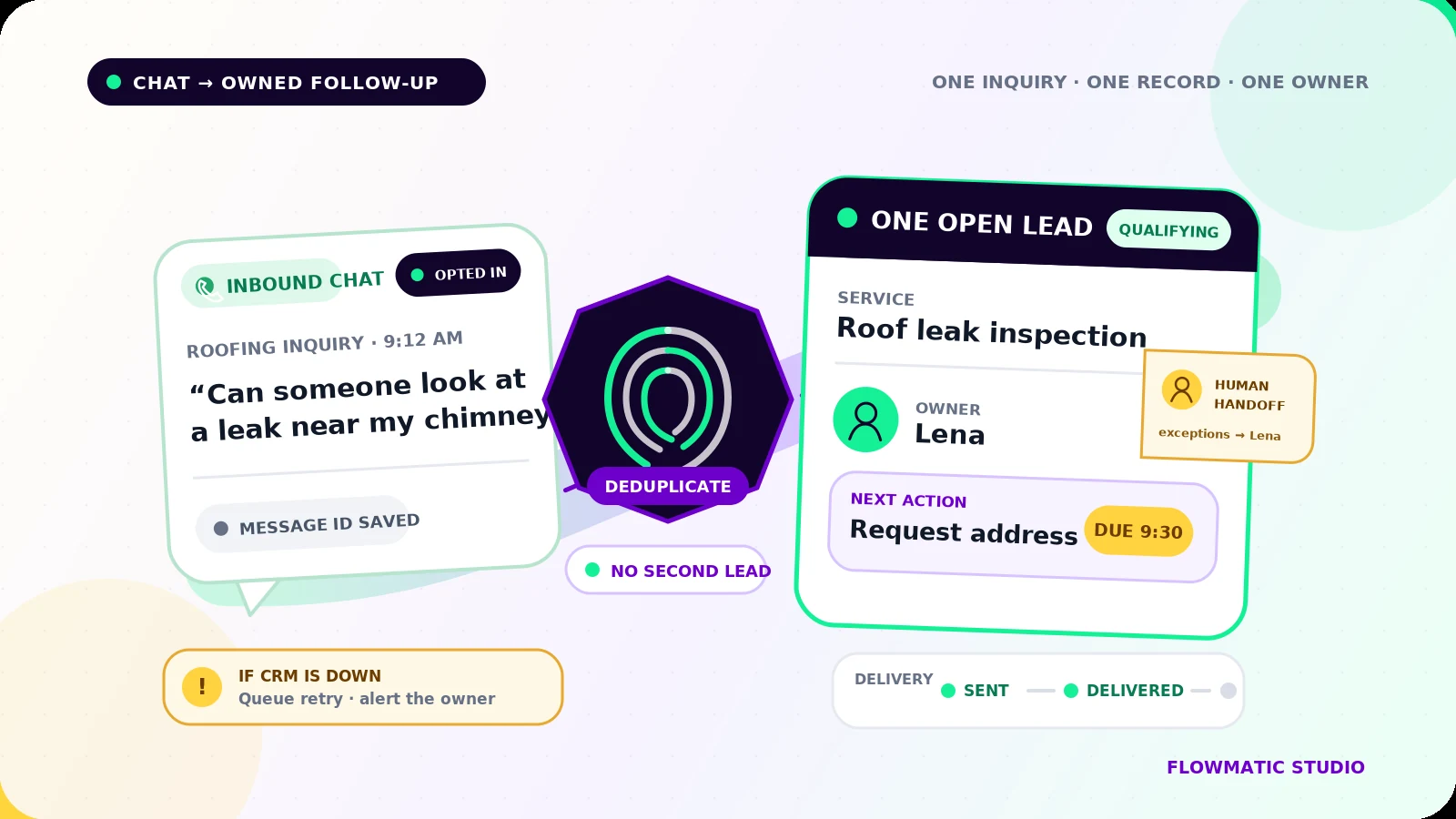
At 9:12 a.m., a homeowner messages, "Can someone look at a leak near my chimney?" The workflow finds no prior event with that message ID, matches the phone number, and opens one roofing lead.
It records the opt-in context, assigns Lena, and sets the next action to Request address and safe inspection times by 9:30 a.m. The acknowledgement names the business and says Lena will reply. The workflow stores its message ID and later updates the delivery state.
If the customer replies, the automation adds the message to the same lead and alerts Lena. It does not estimate the repair or promise an arrival time. If the acknowledgement fails, the record moves to Failed - review required and Lena gets a manual-contact task.
Flowmatic's mortgage onboarding demo shows the same intake principle in another service: collect the minimum useful information and keep the next step visible.
Test the failure paths before launch
Test a new contact, returning contact, duplicate webhook, simultaneous messages, missing consent evidence, opt-out, closed service window, rejected template, CRM outage, failed send, unassigned lead, and human takeover.
Confirm the record, owner, next action, suppression state, and retry behavior. Run a small monitored pilot before expanding.
If WhatsApp leads are still living only in individual chats, request a Flowmatic workflow audit. We will map the inbound event, consent record, deduplication rule, owner handoff, and failure path before recommending a build.
Sources
- [1] https://developers.facebook.com/docs/whatsapp/conversation-types — Service messages | Meta for Developers
- [2] https://developers.facebook.com/docs/whatsapp/cloud-api/guides/set-up-webhooks — Webhooks | Meta for Developers
- [3] https://developers.facebook.com/docs/whatsapp/message-templates/guidelines — Template fundamentals | Meta for Developers
- [4] https://business.whatsapp.com/policy?lang=en_US — WhatsApp Business Messaging Policy
- [5] https://developers.google.com/workspace/sheets/api/reference/rest/v4/spreadsheets.values/append — Method: spreadsheets.values.append | Google Sheets
- [6] https://developers.facebook.com/documentation/business-messaging/whatsapp/getting-opt-in — Get opt-in for WhatsApp | Meta for Developers
- [7] https://developers.facebook.com/documentation/business-messaging/whatsapp/webhooks/reference/messages/status — Status messages webhook reference | Meta for Developers
Make every WhatsApp inquiry visible
Map consent, deduplication, ownership, and failure handling
Flowmatic can map the inbound event, consent record, deduplication rule, owner handoff, and failure path before recommending a build.
Request a workflow audit