
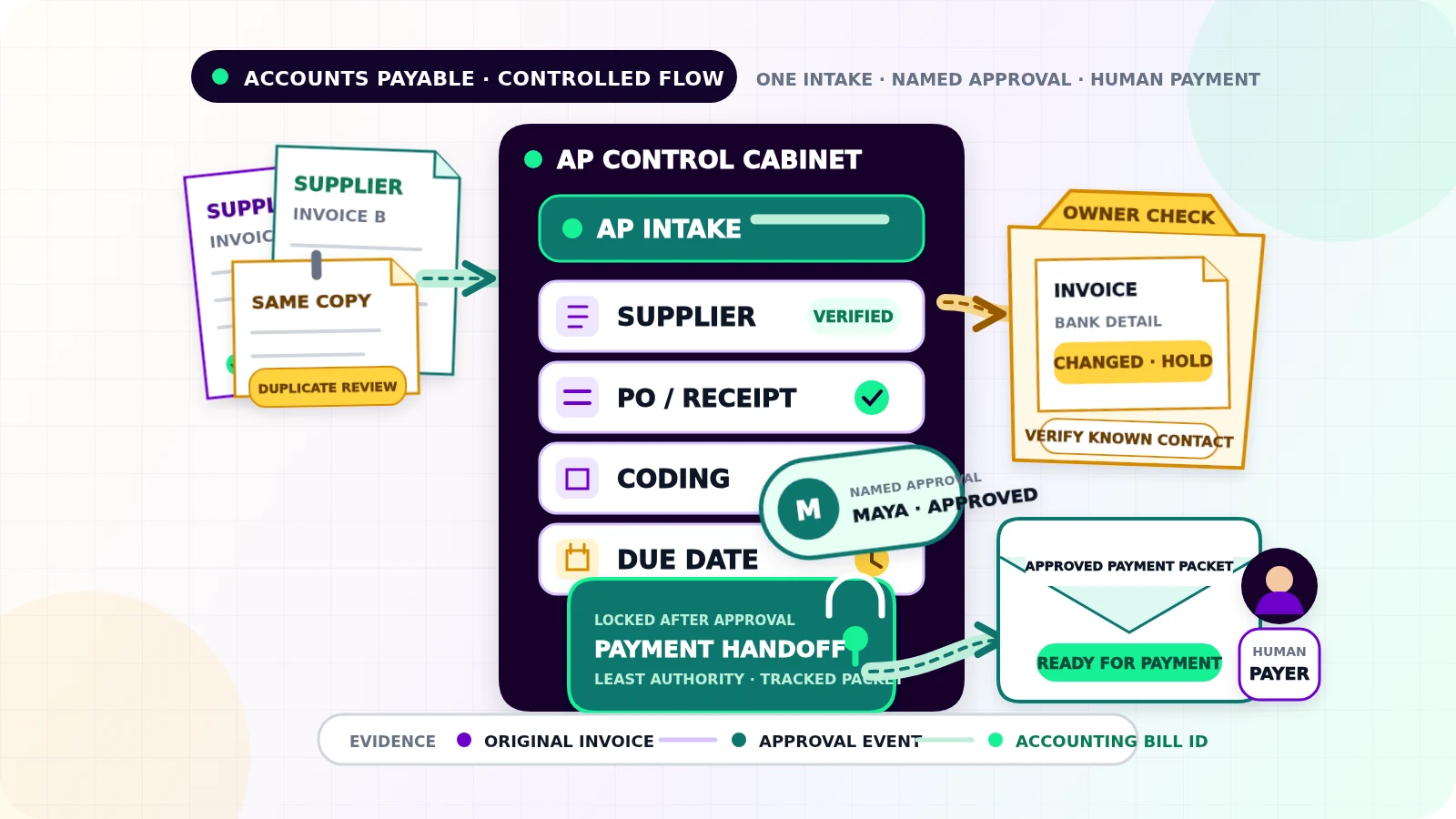
A supplier invoice arrives by email. Another copy lands in a shared folder, and a manager forwards it to the owner. Nobody can tell whether it was checked, approved, or handed off for payment.
Accounts payable automation for small businesses should turn that confusion into one controlled record. The workflow captures each supplier invoice, checks its context, routes it to the right approver, shows when it is due, and prepares an approved payment handoff. Uncertainty stays visible and owned by a person.
This process is narrower than "automating finance." It covers bills your business owes to suppliers. It does not cover employee expense reimbursement, customer invoice reminders, or matching completed payments to bank deposits. Those are separate workflows with different records and owners.
Give supplier invoices one intake route
Choose one approved entry point, such as a dedicated accounts-payable email address or an upload form. Other channels can forward into it, but they should not create separate records.
For every submission, keep the original file and capture:
- supplier name and stable supplier ID
- supplier invoice number
- invoice and received dates
- currency, subtotal, tax, and total
- purchase-order number, contract, or requester when applicable
- payment terms and stated due date
- source message and attachments
Extraction tools can propose these fields, but unreadable values, conflicting totals, missing pages, and unexpected currencies should stop in an intake queue.
Create a stable AP record ID immediately. If the same email or upload is processed again, the workflow should return the existing record instead of opening another payable.
Check supplier and purchase context before coding
First confirm that the supplier exists in the approved supplier list and that the invoice uses the supplier details already on file. A change to a supplier's bank account, legal entity, or payment destination is not a routine invoice edit. Hold it for independent verification through a known contact method.
When a purchase order exists, compare the invoice with the approved order. A two-way match compares the purchase order and invoice. A three-way match also checks what was received. Oracle's documentation describes those controls as matching purchase-order, receipt, and invoice quantities within configured tolerance before payment.[2]
A small business may not use purchase orders for rent, utilities, or recurring software. Give those bills an approved contract, subscription owner, or recurring-bill rule. "No PO" should never mean "no check."
Send quantity differences, unapproved charges, missing receipt evidence, expired contracts, or invoices from unknown suppliers to review. The workflow can identify a mismatch. A person decides whether the invoice is corrected, accepted under policy, disputed, or rejected.
Treat duplicate detection as a review step
Compare each new record with open and paid bills using the supplier ID, invoice number, amount, currency, invoice date, purchase-order reference, and file fingerprint.
An exact supplier plus invoice-number match is a strong duplicate signal. The same amount and date is only a candidate. Suppliers may reuse formats, send installments, or issue separate invoices for equal amounts.
Show both records together. A reviewer can mark a duplicate, link a credit note, or confirm both bills. Preserve who reviewed the decision and why.
Code the bill without inventing accounting decisions
The workflow can suggest an account, tax treatment, cost center, project, or location from approved supplier rules and purchase context. It should show the source of every suggestion.
Recurring rules can reduce retyping, but material changes should reopen review. Missing or uncertain coding belongs with the bookkeeper or accountant, not an automated guess.
Keep the original invoice, extracted values, proposed coding, corrections, and final coding together. The IRS lists paid bills and invoices among the supporting documents businesses keep for book entries and tax records.[3] Retention and tax requirements vary, so use rules approved for the business and jurisdiction.
Route approval by authority, not availability
Define who may approve each type of bill before invoices arrive. Rules may use amount, supplier, category, location, project, or whether the purchase had prior approval. Resolve every rule to a named primary approver and backup.
The approver should see the invoice, supplier, duplicate result, purchase or contract reference, receipt evidence, coding, due date, and any exception. Available actions should be clear: approve, return for correction, dispute, or reject with a reason.
Separate invoice approval from payment authority where the team size allows it. QuickBooks, for example, documents distinct bill clerk, bill approver, and bill payer roles, plus separate workflows for bill approval and payment release.[1] A two-person business may combine roles, but it should still record who entered, approved, and released the bill.
Any material change after approval, including supplier, total, currency, coding, bank details, or payment date, should invalidate the prior approval.
Make due dates useful without granting payment authority
Calculate an internal due date from verified terms and the business's payment policy. Keep the supplier's stated date, the calculated date, and any approved change separately. An early-payment discount or disputed due date needs explicit review.
A practical AP view shows bills awaiting evidence, approval, correction, handoff, or supplier response, plus approved bills approaching due date and overdue items with a named owner. Due-date visibility helps plan cash; it does not authorize payment.
Hand off an approved payment packet
Once the bill is approved, create a payment-ready packet containing the AP record ID, supplier, verified payment destination reference, approved amount and currency, due date, payment method, approver, and accounting-system bill ID.
The handoff may create a draft payment, add the bill to a controlled payment batch, or create a task for the person who pays. Use the least authority the integration needs. Do not let the same automation change supplier bank details, approve the bill, and release money.
Ready for payment, Scheduled, and Paid are different states. A successful handoff only proves that the payer received the approved packet. Record the payment reference and confirmed status later, then leave bank-statement matching to the separate payment reconciliation workflow.
Give exceptions an owner and a stop condition
Use one queue for unreadable invoices, unknown suppliers, bank-detail changes, duplicate candidates, missing purchase context, receipt differences, coding questions, absent approvers, changed approved fields, failed accounting writes, and failed payment handoffs.
Each exception needs the AP record ID, failed step, reason, evidence links, owner, first-seen time, and dated next action. Temporary connection failures may retry safely. Uncertain suppliers, amounts, coding, approvals, and payment details require a person.
Test a normal PO-backed invoice, recurring non-PO bill, partial receipt, duplicate attachment, reused invoice number, credit note, changed bank details, foreign currency, disputed charge, absent approver, edit after approval, accounting timeout, and payment-handoff timeout. Verify the payable count, approval history, due date, destination reference, final state, and owner in every case.
If supplier bills still move through forwarded emails and memory, request a Flowmatic workflow audit. We will map invoice intake, duplicate checks, coding, approval authority, due dates, payment handoff, and exception ownership before recommending a build.
Make supplier invoices accountable
Map an accounts-payable workflow your team can trust
Flowmatic can map invoice intake, duplicate checks, coding, approval authority, due dates, payment handoff, and exception ownership before recommending a build.
Request a workflow audit