
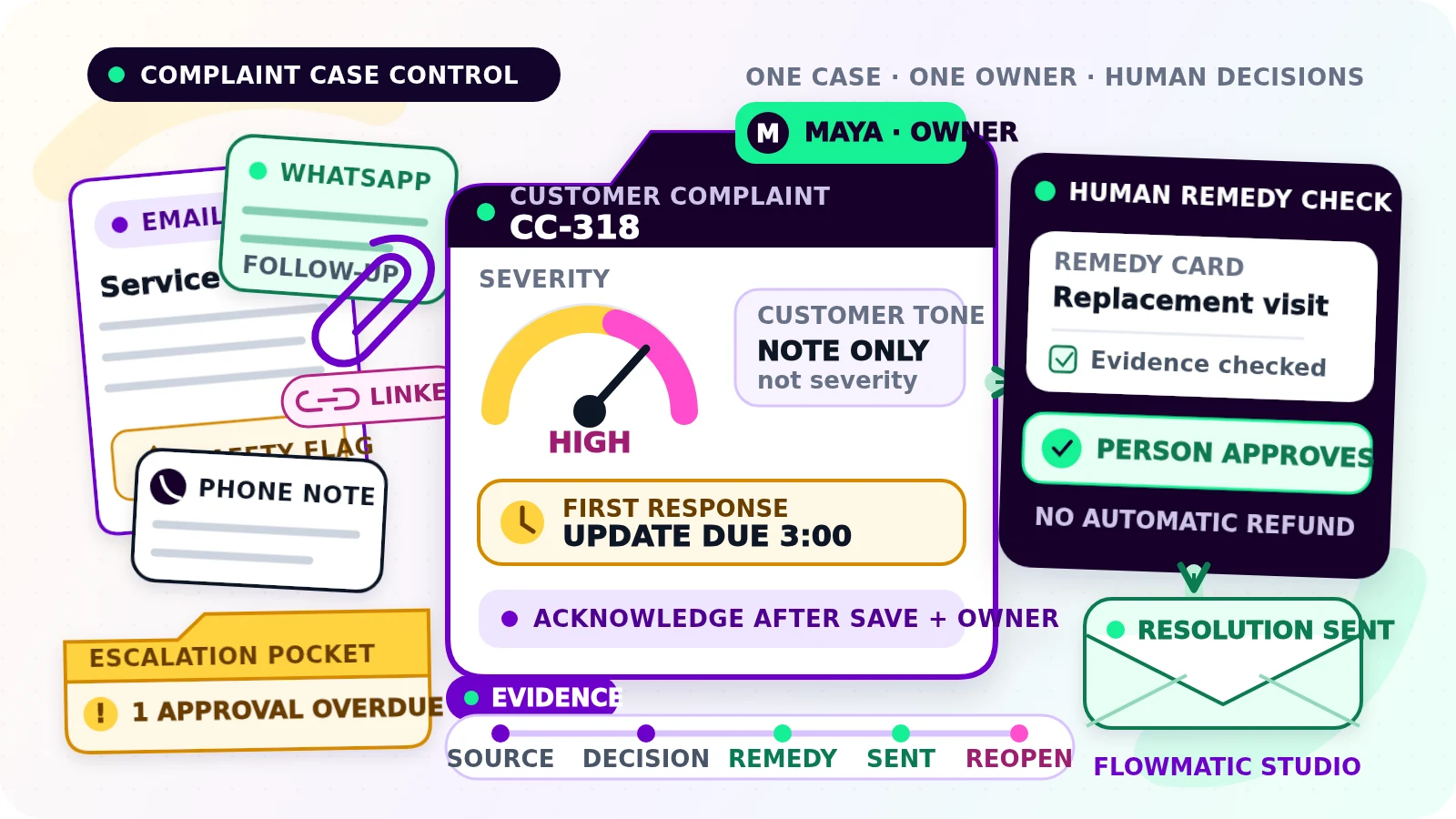
A complaint can arrive as an email, form submission, WhatsApp message, phone note, or reply inside an existing conversation. When those channels stay separate, a serious issue can look like five messages—or disappear as one message that everyone assumes someone else handled.
Customer complaint automation for small businesses should create one owned case, preserve the customer's words, set a response deadline that reflects actual severity, and keep the issue visible until the resolution is verified. It should not decide whether a customer deserves a refund, judge who is right, or send a final answer without a person checking the current case.
Normalize intake without flattening the complaint
Give every complaint a stable case ID. Keep the original message or call note, then normalize only the fields needed to route and manage the work:
- customer and preferred contact method
- related job, order, invoice, appointment, or account
- channel, received time, and source message ID
- concise issue summary and affected service
- safety, financial, legal, privacy, or reputational indicators
- severity, owner, response deadline, and next action
- current status, latest customer contact, and promised update
- requested remedy, approved remedy, and decision authority
- evidence, resolution outcome, and reopen reason
Phone complaints need a consistent note form. Record the customer's words, any employee promise, and any immediate action without presenting uncertain recollection as fact.
Match duplicates and related threads carefully
The same complaint may appear in an email, a WhatsApp follow-up, and a phone call. Before creating another case, check stable references such as customer ID, order or job ID, contact details, source conversation, and a close time window.
A duplicate channel event should attach to the existing case, not open competing work. But similar language is not enough to merge records. One customer can report two separate problems with the same job, and two customers can describe the same service failure.
When the match is uncertain, let a person merge, link, or keep the cases separate with a reason.
Separate severity from sentiment
An angry message is not automatically the highest-severity case, and calm wording does not make a safety risk minor. Sentiment can help a reviewer understand tone, but severity should follow written operational rules.
A practical severity table can consider immediate safety risk, service outage, vulnerable customers, data exposure, financial impact, approaching deadlines, repeated failure, and the number of people affected. Each level should define a first-response target, escalation path, and who may make decisions.
Automation can flag phrases or fields for review. A person should confirm uncertain or high-impact classifications and record any change with a reason.
Assign one owner and one response deadline
Every open case needs one named owner, even when several people contribute. The owner coordinates the response, gathers facts, keeps promises visible, and moves the case forward. A shared team inbox or group notification is not ownership.
Set the first-response deadline from confirmed severity, business hours, and policy. If severity changes, recalculate deliberately and retain the earlier deadline.
Send an acknowledgement only after the case has been saved and ownership is clear. It can confirm receipt, give the case reference, identify the response window, and explain the next contact point:
We received your complaint about job WO-1042 and recorded it as case CC-318. Maya owns the review and will update you by 3:00 p.m. today. If there is an immediate safety concern, please call us on the number below.
An acknowledgement is not a resolution. Avoid language that admits liability, rejects the complaint, or promises a remedy before the facts and authority are clear.
Keep remedies and refunds under human control
The workflow can collect evidence, show the customer's requested outcome, retrieve the relevant order or service record, and route the decision to someone with the right authority. It should not automatically approve or deny refunds, credits, replacement work, contractual concessions, or other material remedies.
Define approval limits and evidence. Record the decision-maker, reason, remedy, customer message, and follow-up. If a refund is approved, do not treat refund requested or refund initiated as refund completed.
Before any update, apology, escalation, or resolution message is sent, re-read the current case. Stop or change the send when the customer has replied, the owner changed, severity increased, a remedy was approved, delivery failed, the case was merged, or the facts can no longer be verified. This send-time check prevents a stale reminder from arriving after a sensitive decision.
Escalate without creating a second owner
Escalation should add attention, authority, or expertise—not duplicate responsibility. Keep the case owner visible while assigning a specific escalation action to a manager, specialist, or privacy contact. State what triggered the escalation, what decision is required, and when it is due.
Use a durable exception view for unassigned cases, overdue responses, disputed severity, missing records, failed messages, unresolved approvals, broken system updates, and cases reopened after closure. Each exception needs a named owner and dated next action. Alerts can draw attention; the exception record is what prevents the issue from disappearing.
Close on evidence, not on a sent message
Define resolution before building the close action. A case may be ready to resolve when the investigation is recorded, the approved remedy is completed, the customer receives the outcome, any operational correction has an owner, and no required follow-up remains open.
Store the final response, delivery result, evidence of the remedy, decision history, and closure reason. Where appropriate, ask the customer to confirm whether the agreed action addressed the issue. No reply does not always mean agreement, so use a written closure rule and allow the case to reopen without losing its history.
Track cases without owners, time to first human response, overdue updates, remedy approval time, reopened cases, failed deliveries, and recurring complaint categories. Review the underlying cases: fast closure is not useful when the remedy remains incomplete.
Protect access and test failure modes
Complaint records can contain personal details, payment issues, health or safety information, and allegations about staff. Restrict access by role, avoid copying sensitive details into broad notifications, log material changes, and retain only what the business needs under its approved policy.
Before launch, test duplicate messages, one complaint across several channels, two complaints in one thread, missing order references, incorrect severity, no available owner, a customer reply seconds before escalation, a remedy changed after approval, a failed refund update, message delivery failure, simultaneous staff edits, closure with an open action, and a reopened case.
For each test, confirm there is one active case, one accountable owner, a truthful deadline, a visible exception when needed, no stale outbound message, and enough history to recover safely. Start with one complaint channel and a monitored queue. Add channels only after staff can manage the exceptions.
If complaints still move between inboxes, chats, and memory, request a Flowmatic workflow audit. We will map intake, case identity, severity, ownership, decision controls, escalation, and resolution evidence before recommending a build.
Make every complaint accountable
Map a complaint workflow your team can trust
Flowmatic can map intake, case identity, severity, ownership, decision controls, escalation, and resolution evidence before recommending a build.
Request a workflow audit